TryHeartMe - Web-based TryHackMe Challenge
TryHeartMe - Web-based TryHackMe Challenge
Goal
The goal is to find the secret ValenFlag, which as most tryhackme flags go, should probably start with THM.
Initial recon
- Using
nmap, we can see that two ports are open- Port
22, default ssh - Port
5000, which hosts a website
- Port
Website
- The challenge provides a website at port
5000 - You can browse around as a guest. There are many things to buy, and they require credits.
- You can login and signup.
- Signing up takes a email address and a password of minimum 6 characters. That’s it.
- Once you do that, while inspecting the page, with the tab set on network or storage/cookies, you will see a jwt-token with the variable name tryheartme_jwt being set.
- As a user, you can log out and login, and nothing is revealed to be special here. Mainly, you do not have any credits. Your credits are 0.
- Moreover, when you inspect the page, you can see the Server being used -Server: Werkzeug/3.0.1 Python/3.12.3, might be of interest?
Exploit, or one way to do it
- If you go to jwt.io Website, to decode jwt, you can paste the jwt you received, and see the output
- There are 5 fields revealed:
- email, the email of your account
- “role”: “user”
- “credits”: 0,
- iat
- theme
- Clearly, we have to do something with the role or the credits.
Time to load cyberchef :)
- With cyberchef, you have a recipe called JWT-Sign. Use it
- The default private signing key is secret, let’s see if it works.
- In the input, place the decoded json, change the role to admin or increase your credits
- Encode it
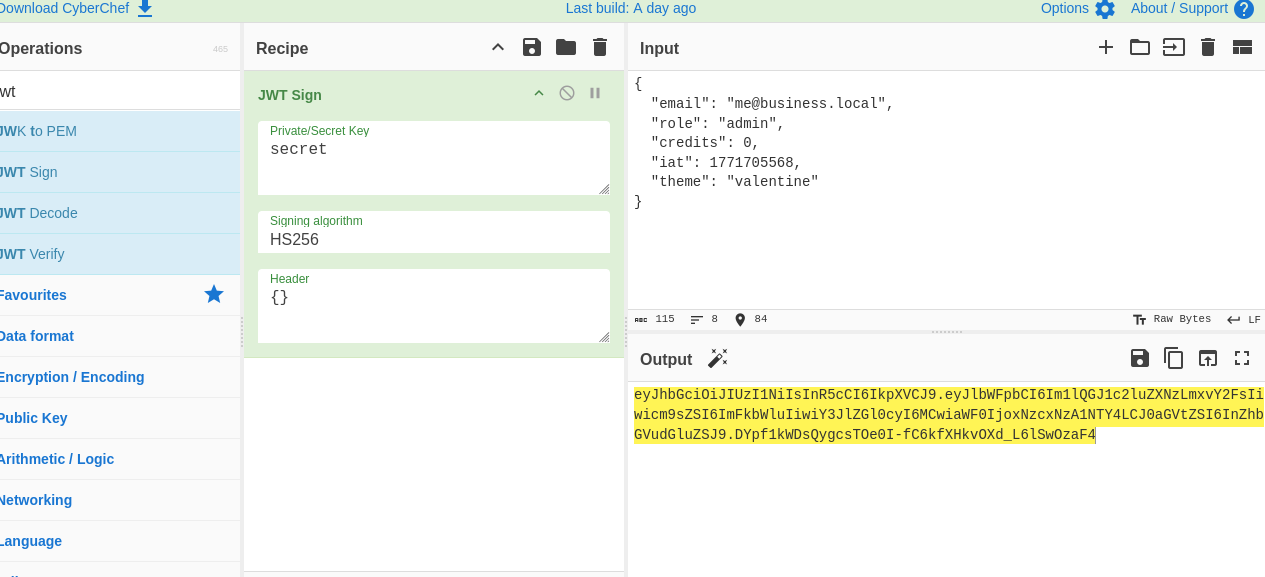
- Now you have a modified jwt, take it, and replace your original cookie with this (inspect page -> storage -> cookies), and reload the page
- You should now have 5000 credits (if you modified role to admin), and an option to buy the valenflag for 777. Since 5000 > 777 (obviously), just buy it and you will get the flag.
Vulnerability
What went wrong here?
The developers of this vulnerable website do not validate the digital signature!
- You can try different private signing keys in cyberchef, to sign the jwt token, and place it as a cookie, and reload, and you will see changes. The server does not reject your cookie, because it doesn’t verify the digital signature at all.
- Basically, there is no integrity check within this website. Anyone can tamper with it with ease.
JSON Web Token
- Consists of three parts: Header, Payload and Signature.
- The server doesn’t hide data or encrypt it. It just encodes in base64.
- However, digital signatures are used to ensure the data isn’t tampered with.
- The header and payload and signed with a private signing key.
In this challenge, the website doesn’t validate the digital signature. You can use any private signing key, anything. Since it isn’t encrypted, and just base64 encoded, the server can see the JSON values that you provide after modification.
It is also important to note, that there may be other ways too. JWTs have many vulnerabilities
Happy Hacking!
This post is licensed under CC BY 4.0 by the author.