TryHackMe Threat Intelligence for SOC room
Our only focus is Technical Intel for now, utilizing artefacts generated by adversaries to improve the Security Operations Pipeline. IOC-based Threat Intelligence
Producers and Consumers
- Producers gather, analyze and disseminate threat intel data for others and themselves. Includes cybersecurity vendors, research labs. They collect data using various methods ranging from standard like network monitoring to specific like analyzing honeypot servers. Also organizations could collect IOCs based on internal incidents handled previously.
- Consumers are organizations or individuals who consume threat intel produced by Producers. This group typically leverages the intelligence data to
- Identify Vulnerabilities
- Prevent and Detect intrusions
- Respond to Incidents (Incident Response)
- Collaborate with others
Uncoder.io accepts IPs, Domains, URLs, hashes, emails and files as IOCs.
Task (Threat Intelligence Feeds)
Uncoder.io requires signing up
Feed the following IPs to uncoder:
1
2
3
4
5
117[.]213[.]7[.]8
119[.]180[.]220[.]224
144[.]202[.]127[.]44
119[.]180[.]220[.]224
221[.]15[.]94[.]231
Follow the steps: Classic -> Generate -> Select Input as Threat Report or IOCs -> Select Output as IOC query and Elastic Stack Query (Lucene).
1
destination.ip:("117.213.7.8" OR "119.180.220.224" OR "144.202.127.44" OR "221.15.94.231")
There are only 4 real IPs
Now go to the IP address given, where an instance of elastic stack is running, choose filebeat- index, change the timeframe to span many years (since this is a tryhackme room), and paste this query. You should get 14 hits.
Now do the same for the below IPs:
1
2
3
4
5
6
7
8
9
10
11
12
13
14
15
135[.]181[.]103[.]89
185[.]224[.]126[.]215
185[.]224[.]128[.]215
171[.]24[.]136[.]15
171[.]22[.]136[.]15
195[.]133[.]40[.]108
103[.]190[.]37[.]169
103[.]170[.]37[.]169
103[.]190[.]37[.]169
185[.]224[.]128[.]215
107[.]175[.]202[.]151
107[.]175[.]202[.]158
195[.]133[.]40[.]108
107[.]175[.]202[.]158
109[.]206[.]240[.]194
Using uncoder:
1
destination.ip:("135.181.103.89" OR "185.224.126.215" OR "185.224.128.215" OR "171.24.136.15" OR "171.22.136.15" OR "195.133.40.108" OR "103.190.37.169" OR "103.170.37.169" OR "107.175.202.151" OR "107.175.202.158" OR "109.206.240.194")
48 hits in elastic stack
- To get unique IP addresses
- You have to visualize, or create a data table to find the other answer, unlike in Splunk, where you have
stats 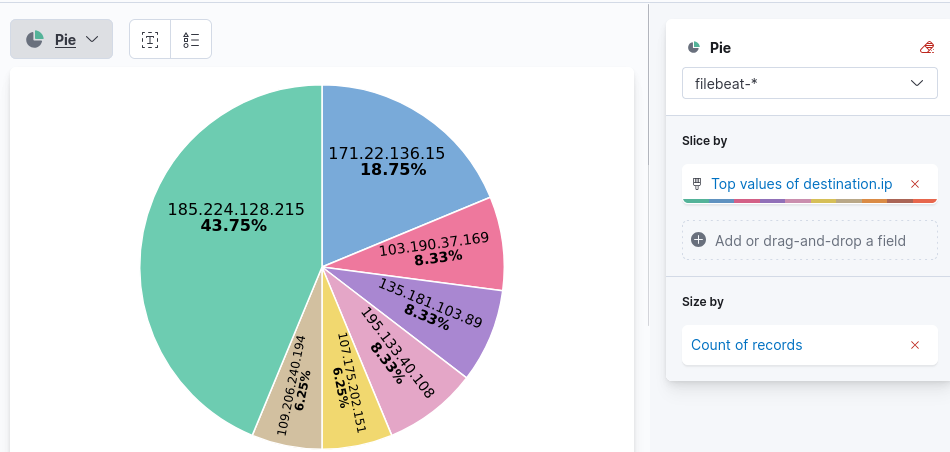
- You have to visualize, or create a data table to find the other answer, unlike in Splunk, where you have
- IP address of compromised host: This is just the source ip from which all the traffic is flowing
- To find destination port of connections
- Just change the query for just the given IP. You will get 3 hits, and you can find the destination port using the given field.
Intelligence-driven Prevention
- Domains are attributed to URLs used to host malicious files, C2 callbacks or email domains used for spam.
- IP addresses are attributed to addresses known to execute attacks from external assets (outside the network) or outbound callbacks from malware.
Security measures
- IP Blocking via Firewall
- Block incoming or outgoing traffic (ingress or egress) based on IP.
- Domain Blocking through Email Gateways
- Prevent known malicious domains from forwarding incoming email messages.
- Just prevents threat actors from reaching inbox of target users.
- Reduces a huge attack surface, reducing the risk of phishing.
- Domain Blocking through DNS Sinkhole
- Redirect all DNS requests from a known malicious domain to a sinkhole, preventing resolution to the correct malicious IP.
Task (Hunting Sinkholed Domains)
- agrosaoxe[.]info
- Use the above domain information provided by the Threat Intel team, and the filebeat- index to hunt all domains identified as malicious by DNS sinkhole.
- Use the following queries as aids
dns.question.name: "replace with domain"dns.answers.data: "replace with sinkhole IP"
Date between 02/14/2023 and 02/17/2023
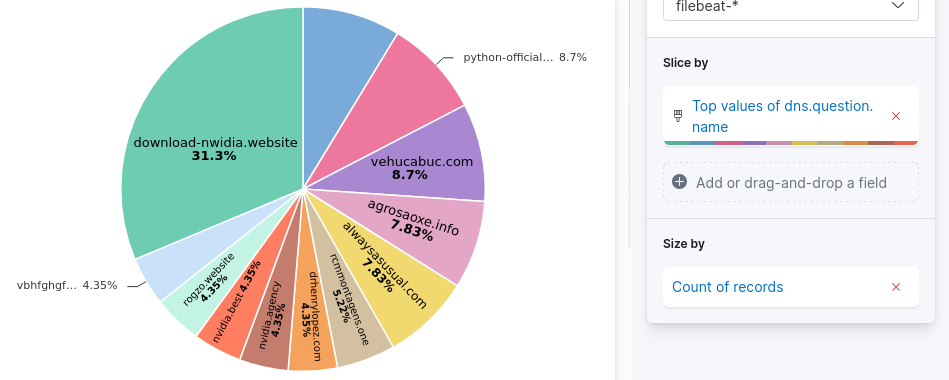
- 11 hits for the given domain
- Before deploying sinkhole, two IP addresses. These two have significantly lower traffic than the third IP address, so you can assume the third one is the IP address used for DNS sinkhole.
- To get unique domains, you have to use visualization.
Intelligence-driven Detection
Instead of using IP, Domains and URLs to detect directly (which may require constant fine-tuning with growing IOCs), use some techniques from the previous section:
- DNS sinkhole: Domains resolving a loopback may indicate connection to malicious server.
- Firewall IP blocking: Blocked connections may indicate malicious activity
- Proxy Blocking
- Email gateway blocking
Now, the detection rules only rely on blocklist updates from prevention tactics.
Sigma, which is an Open source generic signature language to describe log events in a structured format, can be used for hunting for sinkholed domains.
1
2
3
4
5
6
7
8
9
10
11
12
13
14
15
16
17
title: DNS Sinkhole
author: TryHackMe User
description: Sigma rule for sinkholed DNS queries
logsource:
 category: dns
detection:
 select_sinkholed:
   dns.resolved_ip:
     - '0.0.0.0'
 condition: select_sinkholed
falsepositives:
 - Unknown
status: experimental
level: medium
tags:
 - dns
 - filebeat
Convert this sigma rule to elastalert using uncoder.
Elastalert is an open source framework for alerting on anomalies, spikes or other patterns of interest. It integrates with elastic search, kibana and other tools.
This task requires sshing to the other machine, instead of using elastic stack.
The default config.yaml of elastalert is as follows:
1
2
3
4
5
6
7
8
9
10
11
12
13
14
15
16
17
18
19
cat config.yaml
rules_folder: rules

run_every:
  minutes: 1
buffer_time:
  minutes: 15

es_host: 127.0.0.1
es_port: 9200

es_username: elastic
es_password: elastic

writeback_index: elastalert_status
writeback_alias: elastalert_alerts

alert_time_limit:
  days: 2
You have to modify it with elastalert for your sigma rule.
1
2
3
4
5
6
7
8
9
10
11
12
13
alert:
- debug
description: Sigma rule for sinkholed DNS queries
filter:
- query:
    query_string:
      query: dns.resolved_ip:/0\.0\.0\.0/
index: filebeat-*
name: dns_sinkhole
priority: 3
realert:
  minutes: 0
type: any
You have to go to rules (elastalert/rules) and create sinkhole.yaml with the above elastalert
Put resolved IP address into “”. So “0.0.0.0” instead of using backslashes.
| Then run the command “elastalert –start 2023-02-16T00:00:00 –verbose 2>&1 | tee output.txt” from the elastalert directory. |
With that, you should get results in output.txt and use it to solve the remaining questions.