TryHackMe Slingshot ELK Stack Challenge
Scenario
- You are a SOC analyst and have to look into the web server logs to notice something suspicious and uncover potential malicious activity.
- The IT Staff mention that the suspicious activity started on July 26, 2023.
- You will use Elastic Stack / Kibana to analyze the logs
- Answer the following questions
- What vulnerabilities did the attacker exploit on the web server?
- What user accounts were compromised?
- What data was exfiltrated from the server?
Analysis
There is an index, apache logs
We will modify the starting date to July 26, 2023. We can see that everything really happens between 14:00:00 and 15:00:00. You can narrow down further.
- Based on initial analysis, looking through some of the logs, the remote address seems to be
10.0.2.15. This is the attacker’s address. 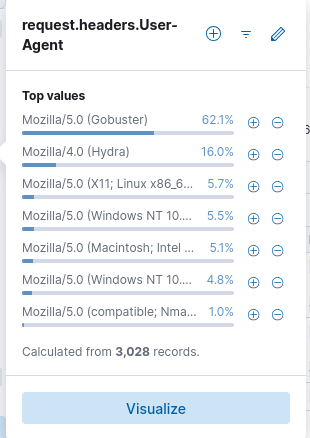
- Nmap Scripting Engine, was one of the first scanners the attacker ran
- Add user agent as a column, and just scroll through. Make sure you sort the timestamp correctly
- Mozilla/5.0 (Gobuster), for directory enumeration
response.status : 404, 1867, attacker failed to find 1867 requested resources on the web server.- To find the flag under interesting directory attacker, narrow down on successful responses with gobuster. That is, status 200 with user agent being gobuster.
request.headers.User-Agent : "Mozilla/5.0 (Gobuster)" AND response.status : 200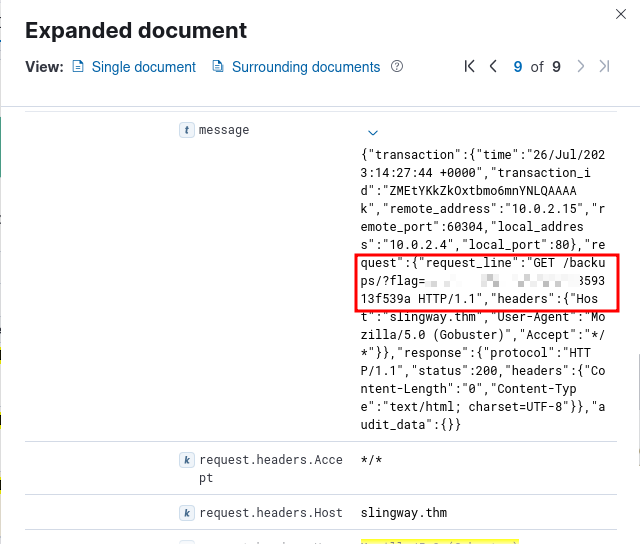
It may be useful to add the
request.headers.User-Agentfield as a column. To do that, simple navigate to the fields on the left, search for the field, and click the+icon to add it as a column. This challenge can be easily solved using this field
- The attacker then finds an interesting login page,
admin-login.php. This comes under status 401 however, which is why you couldn’t see it in the previous query. - The attacker starts to use hydra, and the base64 encoded strings vary towards the end. This is because, the attacker sets the username as
adminand only changes the password to try. Eventually, one of the passwords is right and you can find it using the following query:request.headers.User-Agent : "Mozilla/4.0 (Hydra)" and response.status : 200. This has only 1 hit.
- /uploads/easy-simple-php-webshell.php, attacker uploaded this web shell after gaining admin privileges
Once again, add the
http.urlfield as a column, makes it much easier to analyze
- There is a flag starting with
THMin file uploaded to admin directory , -http.url: /admin/upload.php?action=upload, check this entry
Beyond this point, you just have to go through the logs manually. Read them, and the attackers’ steps become quite obvious
- /uploads/easy-simple-php-webshell.php?cmd=whoami
- Attacker tries to traverse directories:
/admin/settings.php?page=../../../../../../../../etc/phpmyadmin/config-db.php - Attacker accesses sensitive database:
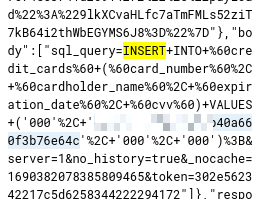
/phpmyadmin/db_structure.php?server=1&db=customer_credit_cards&ajax_request=true&ajax_page_request=true&_nocache=1690381990886219697&token=302e562342217c5d6258344222294172 - There is something the attacker inserted into the database. That’s the hint. So just type
insertas the KQL query, and search and you will find
The End
Answers to the main questions from the scenario
- What vulnerabilities did attacker exploit?
- weak admin password, that hydra was able to crack
- local file inclusion vulnerability, allowing the attacker to upload and use a web shell
/admin/settings.phpis not escaping../, which allows directory traversal and exposes sensitive database files
- What user accounts were compromised?
admin
- What data was exfiltrated?
customer_credit_cardsdatabase. One log shows this file being exported.
That’s it. This was an easy task, requiring simple analysis. Once you find the log where the attacker successfully finds the password, from then on, you just have to go through the logs manually to see what the attacker does to solve the challenge. Not for real life, but to some extent, that’s true.
Doing all of that results in this pretty cool badge: