TryHackMe Dev Diaries Challenge
Disclaimer: This post contains my personal notes and methodology for the respective TryHackMe room. All the credits for the room and the lab environment go to the original creators at TryHackMe. Flags are not revealed to preserve the challenge for others.
Objective
Hunt through online development traces to uncover what was left behind
A website developed by a freelance developer.
Source code not shared.
Developer has since disappeared.
Your only starting point, the primary domain: marvenly.com.
Questions
- What is the subdomain where the development version of the website is hosted?
- What is the GitHub username of the developer?
- What is the developer’s email address?
- What reason did the developer mention in the commit history for removing the source code?
- What is the value of the hidden flag?
Basic OSINT
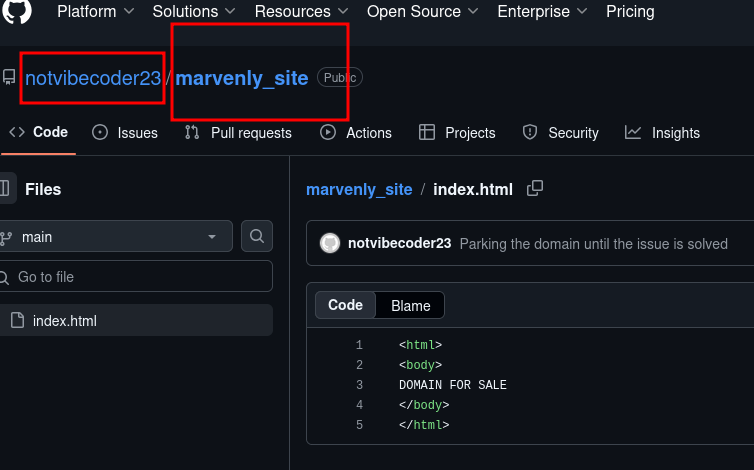
First things first, just search github marvenly.com on a search engine, and you will get certain results.
You will get the GitHub Username:
What is the subdomain where the development version of the website is hosted?
We can use gobuster to find this out.
1
gobuster dns --do marvenly.com -w /usr/share/wordlists/SecLists-master/Discovery/DNS/subdomains-top1million-20000.txt --no-error
We find a domain! admin[.]marvenly[.]com. That gives us more information.
But we can’t find anything else. Turning to online DNS tools such as dnsdumpster[.]com, we get another url: uat-testing[.]marvenly[.]com
Stick to using online tools in OSINT challenges, rather than using tools like gobuster.
And now comes the best part: Wayback machine. There is an entry for the uat-testing domain, recorded on 19th January.
:( You won’t find much information with that unfortunately.
Let’s go back to GitHub. Maybe there’s something more there.
GitHub
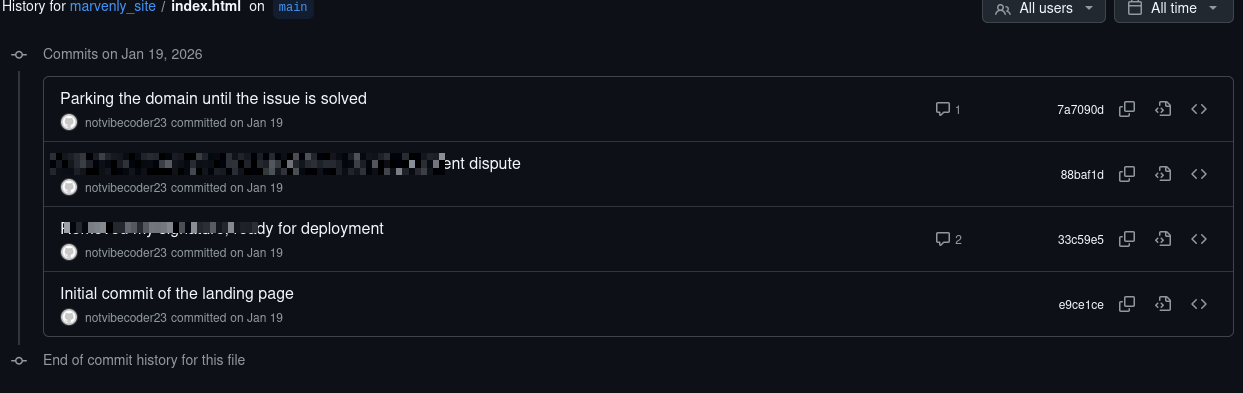
Remember the Github Page? Turns out, there is a parent commit, and if you click that, you get the source code:

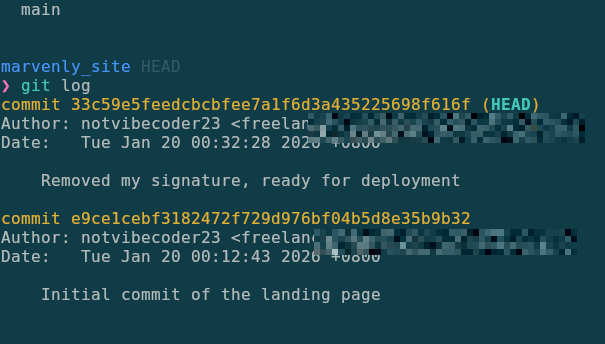
And finally, to find the email used by the freelance developer, all you have to do is clone the repository, and check the logs yourself
Key Takeaways
Clone a github repository when you want to analyze it further. Saves a lot of time.
Git/GitHub never forgets!